
Snowflake Native dbt Without dbt Cloud: What Breaks in Production
- SaaS & Tech
TL;DR
You can run production dbt inside Snowflake without dbt Cloud and without a local dbt Core install — Snowflake's native runner handles compilation and execution through its own git integration. Four things break silently: correlated subqueries fail at runtime with no compile error, macros inside PARTITION BY return wrong results, seed type inference corrupts IDs with leading zeros, and there is no local development. For mid-market teams under 50 models and 10 analysts the $1,800–$5,000/month saved usually justifies the thinner safety net, provided you add a validate_dev_target macro before the first model touches production.
Key takeaway — You can run dbt inside Snowflake without dbt Cloud. What the docs skip: correlated subqueries fail silently at runtime, macros inside PARTITION BY produce wrong results without errors, seed type inference corrupts IDs, and there is no local development. This post documents each constraint, the fix, and the one macro every Snowflake-native dbt project needs before its first model touches production.
Search “dbt without dbt Cloud Snowflake” and you’ll find vendor docs, pricing comparisons, and a few Reddit threads that trail off mid-answer. What you won’t find is a practitioner who ran a production dbt project this way and documented what actually broke.
This is that post.
The short answer
You can run dbt natively inside Snowflake without dbt Cloud and without a local dbt Core install. Snowflake’s built-in dbt runner handles compilation and execution through its native git integration. For teams already on Snowflake with a preference to keep the stack simple, it’s a reasonable choice.
Here’s what the vendor docs skip: correlated subqueries fail silently at runtime, macros inside window functions produce wrong results without errors, seed type inference will corrupt your IDs, and you cannot run or debug anything locally. The workflow is slower. The safety net is thinner. And you need a production-safety macro from day one — not week two.
Why did we choose the native runner over dbt Cloud?
We were brought in to modernize a cloud security company’s analytics platform — migrating from legacy BI to a modern dbt + Snowflake + Sigma stack over five months. The data team had an existing Snowflake environment, Okta SSO, and no appetite for managing another SaaS vendor relationship. dbt Cloud was on the table. So was standalone dbt Core wired to a CI runner. We evaluated both and chose Snowflake’s native dbt integration.
The reasoning: the authentication story was already complex (more on that in the Okta + Snowflake auth post). Adding dbt Cloud’s OAuth layer on top of Okta SSO on top of Snowflake network policies was friction the team didn’t need. The native runner kept secrets in one place, used the existing git integration, and let Snowflake’s own scheduler handle deployments. On paper: elegant. In practice: a constraint catalog we had to discover and document ourselves.
What breaks in Snowflake-native dbt? The gotcha catalog
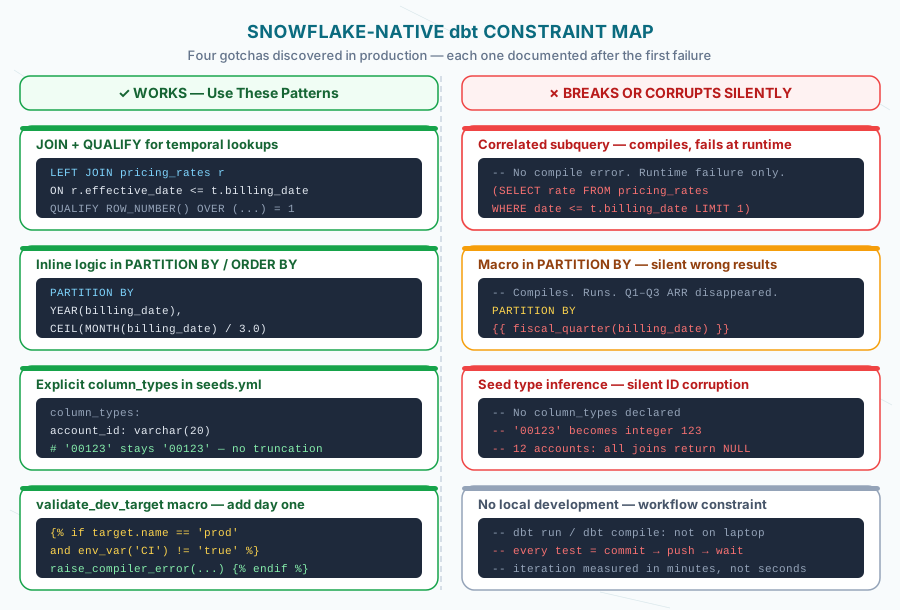
1. Correlated subqueries fail at runtime — with no compile error
This was the first production failure. Claude Code, operating on standard dbt patterns, generated temporal lookups as correlated subqueries. They compiled cleanly. They failed when Snowflake executed them.
-- Fails at runtime in Snowflake native dbt (no compile error)
SELECT *,
  (SELECT rate
   FROM pricing_rates
   WHERE effective_date <= t.billing_date
   ORDER BY effective_date DESC
   LIMIT 1) as rate
FROM billing t
The replacement is the JOIN + QUALIFY pattern, which is both Snowflake-idiomatic and faster:
-- Works in Snowflake native dbt — and performs better
SELECT t.*, r.rate
FROM billing t
LEFT JOIN pricing_rates r
  ON r.effective_date <= t.billing_date
QUALIFY ROW_NUMBER() OVER (
  PARTITION BY t.billing_id
  ORDER BY r.effective_date DESC
) = 1
Once we documented this in PATTERNS.md and CLAUDE.md, the AI stopped generating the broken pattern entirely. Before we documented it: every temporal lookup was a runtime failure waiting for the next push.
2. Macros in PARTITION BY produce wrong results — sometimes silently
This one is worse than the correlated subquery problem, because the failure mode depends on the macro. Some macros inside PARTITION BY fail at compilation with a dbt error. Others compile cleanly, execute, and return wrong results with no error raised.
We hit the silent case. When you call a dbt macro inside a window function’s PARTITION BY or ORDER BY clause, the native runner can compile it to broken SQL that Snowflake executes without raising an error. The query runs. The results are wrong. We found this when quarterly ARR figures stopped matching the known reference — the root cause was a date-conversion macro being called inside PARTITION BY and producing incorrect partitioning.
-- DO NOT do this in Snowflake native dbt (wrong results, no error)
SELECT
  account_id,
  SUM(arr) OVER (
    PARTITION BY {{ fiscal_quarter(billing_date) }}
  ) as quarterly_arr
FROM arr_base

-- Inline the logic instead
SELECT
  account_id,
  SUM(arr) OVER (
    PARTITION BY
      YEAR(billing_date),
      CEIL(MONTH(billing_date) / 3.0)
  ) as quarterly_arr
FROM arr_base
The rule we added: no macro calls inside PARTITION BY or ORDER BY clauses. Inline the logic every time.
3. Seed type inference will corrupt your IDs
Snowflake’s native dbt infers column types from seed CSV values, and it gets them wrong in predictable ways. Account ID 00123 becomes integer 123. Decimal precision is silently truncated. Date strings parse with incorrect formats.
The fix is explicit column type declarations in seeds.yml — but you won’t know you need this until you’re debugging why account lookups fail for anything with a leading zero:
# seeds.yml — declare every non-obvious type explicitly
version: 2

seeds:
  - name: pricing_rates
    config:
      column_types:
        account_id: varchar(20)
        region: varchar(50)
        rate_adjustment: number(5,4)
        effective_date: date
        product_tier: varchar(100)
We added this after discovering that 12 regional accounts with leading-zero IDs were silently failing lookups. The data was there. The joins were producing nulls. Explicit types in seeds.yml fixed it entirely.
4. No local development — and what that actually means
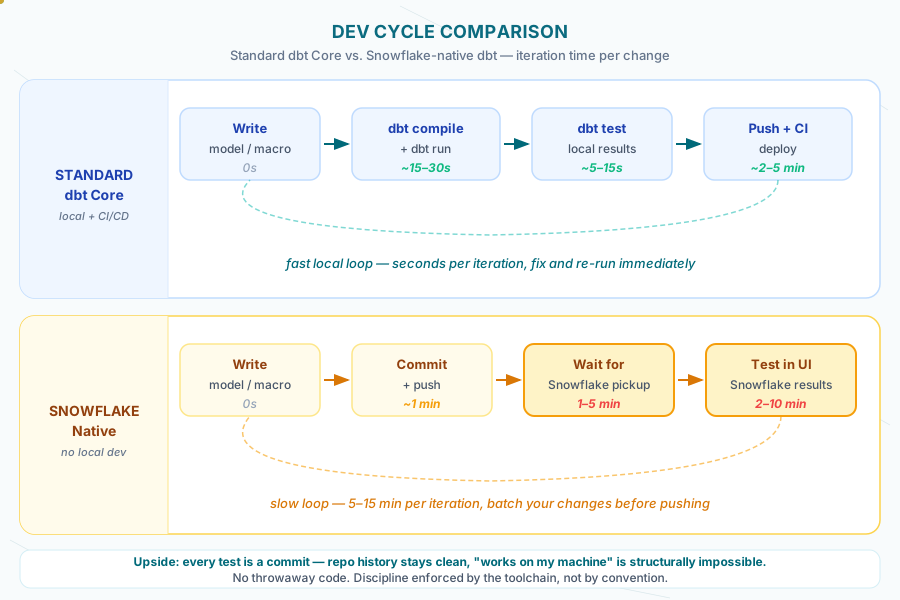
With Snowflake native dbt, there is no dbt run on your laptop. The cycle is: write code → commit → push → wait for Snowflake to pick it up → test in the UI → report results → start the next session. You cannot run dbt debug, dbt compile --select, or dbt test locally against your actual warehouse.
This matters more than it sounds. Debugging a model requires a full push cycle. A quick “does this compile?” check requires committing. The total iteration time per change is measured in minutes, not seconds.
The upside — and it’s real — is that you can’t commit throwaway code. Every test is a commit. The repo history is clean. “Works on my machine” is structurally impossible. On a multi-developer team where three people share a dev environment, that discipline has value.
What it means in practice: test logic in chunks, not line by line. Write complete model files before pushing. Batch your debugging cycles. And document +persist_docs in dbt_project.yml — since you don’t have a dbt Cloud docs site, column and model descriptions written to Snowflake’s native metadata are the next best thing:
# dbt_project.yml
models:
  your_project:
    +persist_docs:
      relation: true    # Model descriptions appear in Snowflake UI
      columns: true     # Column descriptions appear in Snowflake UI
Sigma and other BI tools that connect to Snowflake inherit these descriptions automatically. It’s not a full docs site. It’s enough.
How do you stop dbt from running against production by accident?
The single most important thing you can add to a Snowflake-native dbt project is a macro that prevents a developer from accidentally running against production.
Without local development, the only environment is the Snowflake environment. Snowflake’s native runner will execute against whichever target is configured. If someone tests a model change and their target is prod, it runs in production. No sandbox. No dry run. The model runs.
We solved this with a validate_dev_target macro called at the top of every session:
{% macro validate_dev_target() %}
  {#- List of valid development targets -#}
  {% set valid_dev_targets = ['dev_alice', 'dev_bob', 'dev_shared'] %}

  {#- Catch unknown dev targets -#}
  {% if target.name.startswith('dev_') and target.name not in valid_dev_targets %}
    {{ exceptions.raise_compiler_error(
      "Unknown target: '" ~ target.name ~ "'\n" ~
      "Valid targets: " ~ valid_dev_targets | join(', ') ~ "\n" ~
      "Did you forget to add it to profiles.yml?"
    ) }}
  {% endif %}

  {#- Block prod runs from outside CI/CD -#}
  {% if target.name == 'prod' %}
    {% set is_ci = env_var('CI', 'false') %}
    {% if is_ci != 'true' %}
      {{ exceptions.raise_compiler_error(
        "PROD target can only run in CI/CD!\n" ~
        "   Current target: " ~ target.name ~ "\n" ~
        "   Use a dev_* target for local development."
      ) }}
    {% endif %}
  {% endif %}

  {#- Log confirmation -#}
  {% do log("Target validation passed!", info=True) %}
  {% do log("Target: " ~ target.name, info=True) %}
  {% do log("Database: " ~ target.database, info=True) %}
  {% do log("Schema: " ~ target.schema, info=True) %}

{% endmacro %}
Two things this macro does: it catches unrecognized dev targets — the error message tells you exactly what’s wrong and how to fix it. And it blocks any prod run unless the CI environment variable is set to 'true', which only happens in Snowflake’s automated deployment pipeline.
This runs at compilation time. If someone is misconfigured, the session fails before it touches data. Across the five-month engagement on Snowflake-native dbt, the validate_dev_target macro produced zero accidental production writes. That’s not luck — it’s a macro.
Which Snowflake-specific patterns actually help?
Once you accept the constraints, the Snowflake-specific SQL features become useful. Three that earned their place:
QUALIFY for window function filtering — cleaner than wrapping everything in a subquery, and it’s what makes the JOIN + QUALIFY pattern work:
-- One row per account, most recent billing period
SELECT account_id, billing_date, arr
FROM usage_data
QUALIFY ROW_NUMBER() OVER (
  PARTITION BY account_id
  ORDER BY billing_date DESC
) = 1
TRY_CAST for defensive type conversions — returns NULL on failure instead of raising an error, which matters when you’re migrating data from a legacy system with inconsistent types:
-- Safe numeric conversion — NULL on failure, not an error
TRY_CAST(legacy_account_id AS NUMBER) AS account_id_num
EQUAL_NULL for set comparisons — handles NULL = NULL correctly, which standard SQL does not. Essential when comparing rows across systems where nullable columns are part of the grain:
-- Handles NULL = NULL correctly in change detection
WHERE NOT EQUAL_NULL(source.discount_rate, target.discount_rate)
None of these are in the standard dbt tutorial. All three — QUALIFY, TRY_CAST, and EQUAL_NULL — removed real bugs from the codebase.
What we’d do differently
Start the gotcha catalog on day one. We discovered each constraint during a push cycle — write code, commit, push, fail in Snowflake UI, understand what broke, fix, repeat. By week two we had four hard rules in CLAUDE.md and PATTERNS.md. Those rules should have been there at project start.
Get seeds.yml column types right before you write any model that joins to a seed. The type inference corruption problem compounds fast. If your account IDs are integers when they should be strings, every model that joins on account ID is producing silently incorrect results — no error, just wrong numbers in your BI tool, and hours spent looking in the wrong place.
For the full picture on authentication constraints that shaped this workflow — Okta SSO, dynamic IP whitelisting, the permission dance with the infra team — see the companion post on enterprise security and developer velocity.
For how we used this environment to run a 9-day AI-assisted sprint with 265,638 validated rows, see AI-Assisted Analytics Engineering: How Claude Code Changed Our dbt Workflow.
The documentation for Snowflake-native dbt tells you how to set it up. It doesn’t tell you what breaks, why it breaks silently, or what you need before the first model touches production. That’s what this catalog is for.
The workflow is slower than standard dbt development. The constraints are real. So are the upsides: clean commit history, authentication that stays in one trust boundary, and a deployment pipeline that lives entirely inside your existing Snowflake investment. Whether that tradeoff makes sense depends on your team. If you make it, go in with the constraint catalog already written.
Once dbt is running natively in Snowflake, Cortex Analyst becomes the next question — we tested it on production financial data.
The role and authentication constraints have their own catalog: the hidden tax of Snowflake RBAC.
Primary and foreign keys are the other thing Snowflake declares but never enforces — what to do about that is in dbt Constraints on Snowflake.
If you’re still weighing the license question that led here, the full cost breakdown is in dbt Cloud vs dbt Core: What Mid-Market Teams Actually Pay.
The full engagement — 377 legacy BI objects reduced to 51 dbt models in 45 days, built on Snowflake’s native runner — is in the Analytics Platform Modernization case study.
Considering running dbt natively in Snowflake? We can help you evaluate the tradeoffs before you hit the constraints. Book a quick consultation.
Frequently asked questions
Can you run dbt on Snowflake without dbt Cloud?
Yes. Snowflake's native git integration, scheduled tasks, and secrets management cover what dbt Cloud provides for orchestration. The trade-off is more setup work upfront and more operational ownership of the runner. For mid-market teams without 50+ models or 10+ analysts, the savings of $1,800–$5,000/month usually justify that operational cost.
Is dbt Cloud worth the cost for mid-market teams?
It depends on team size. For 1–3 analysts and under 50 models, the native runner saves real money without losing meaningful capability. For 10+ analysts with cross-domain dependencies, dbt Cloud's documentation, lineage, and metric layer features start to pay for themselves. The break-even is around 8–10 active developers.
Does dbt Cloud have the same constraints?
No. Most of these constraints are specific to Snowflake's native runner. dbt Cloud supports local development, has its own docs site, and runs dbt outside Snowflake's execution environment, so it is the more flexible path when you have the option. The reasons to choose the native runner are tighter Snowflake integration, one fewer vendor to manage, and authentication that stays inside your existing Snowflake trust boundary.
What are the constraints of Snowflake's native dbt runner?
Four constraints matter in production: correlated subqueries compile cleanly but fail when Snowflake executes them, dbt macros called inside PARTITION BY or ORDER BY can return wrong results with no error raised, seed type inference turns account ID 00123 into integer 123, and there is no local dbt run, compile, or test. Each has a documented fix — JOIN + QUALIFY, inlined window logic, explicit column_types in seeds.yml, and batched push-cycle debugging.
Is Snowflake-native dbt the same as dbt Core?
No. Snowflake's built-in runner uses dbt Core under the hood but executes inside Snowflake's managed environment, so there is no local install, no profiles.yml on your machine, and no dbt run from a terminal. Compilation happens in Snowflake's pipeline, triggered by git commits or scheduled jobs. The constraints documented here are specific to that managed runtime, not to dbt Core in general.
How do you stop dbt from running against production by accident?
Call a validate_dev_target macro at the top of every session. It raises a compiler error on unrecognized dev targets and blocks any prod run unless the CI environment variable is set to 'true', which only happens in Snowflake's automated deployment pipeline. Across a five-month engagement it produced zero accidental production writes. It takes 37 lines to write and costs nothing to call, so it is worth it on any project with more than one developer and a production target.
How do you handle RBAC in a multi-developer Snowflake environment?
Each developer gets an isolated database — DBT_DEV__<NAME> — so development work never touches shared schemas, and the validate_dev_target macro prevents accidental production runs at the compilation layer. Production deployments go through a service role with a separate grant structure.
What happens to dbt docs if there is no dbt Cloud docs site?
The +persist_docs setting writes model and column descriptions directly into Snowflake's native metadata, where the Snowflake UI shows them in the schema browser and BI tools like Sigma inherit column descriptions automatically. You lose the lineage graph UI, the searchable docs portal, and the ability to run dbt docs generate and dbt docs serve locally — but for teams already deep in Snowflake it covers most daily-use cases.