
Okta + Snowflake Auth: Security vs Developer Velocity
- SaaS & Tech
TL;DR
Snowflake authentication broke down in three ways during a 5-month cloud security engagement: the externalbrowser authenticator can't open in headless environments (breaking CI and automated scripts), Okta Identity Engine rate limits surfaced as misleading Snowflake OAUTH_TOKEN_INVALID errors rather than clear rate-limit messages, and per-IP network policies blocked developers every time their IP changed. The fix was a three-part architecture: VPN-required network policies instead of per-IP whitelisting, key-pair authentication for service accounts kept entirely separate from Okta+MFA for humans, and per-developer isolated Snowflake databases to prevent dev/prod collisions.
Key takeaway — MFA everywhere. Okta SSO required for every Snowflake session. IP whitelisting on all network policies. All of it correct — all of it getting in the way. This post covers the auth tradeoffs nobody documents: externalbrowser failures in headless environments, Okta OIE rate limiting that surfaces as Snowflake errors, and the three-part architecture that separated human auth from machine auth without weakening security.
Our infrastructure engineer sent a message at 8pm on a Friday: “Let me know what the next error is.”
There was a next error. There was also one after that.
We were three weeks into a 5-month analytics engineering engagement at a cloud security company — which meant the client had an extremely mature security posture. MFA everywhere. Okta SSO required for every Snowflake session. IP whitelisting on all network policies. Dynamic developer IPs that needed daily rotation. GitHub tokens with approval workflows before every integration.
All of it correct. All of it getting in our way.
This post is about the tradeoffs nobody puts in the documentation: how Okta + Snowflake SSO behaves in practice, what externalbrowser auth actually means for your developer workflow, and what we settled on after running into every wall.
The setup: SSO-only, no exceptions
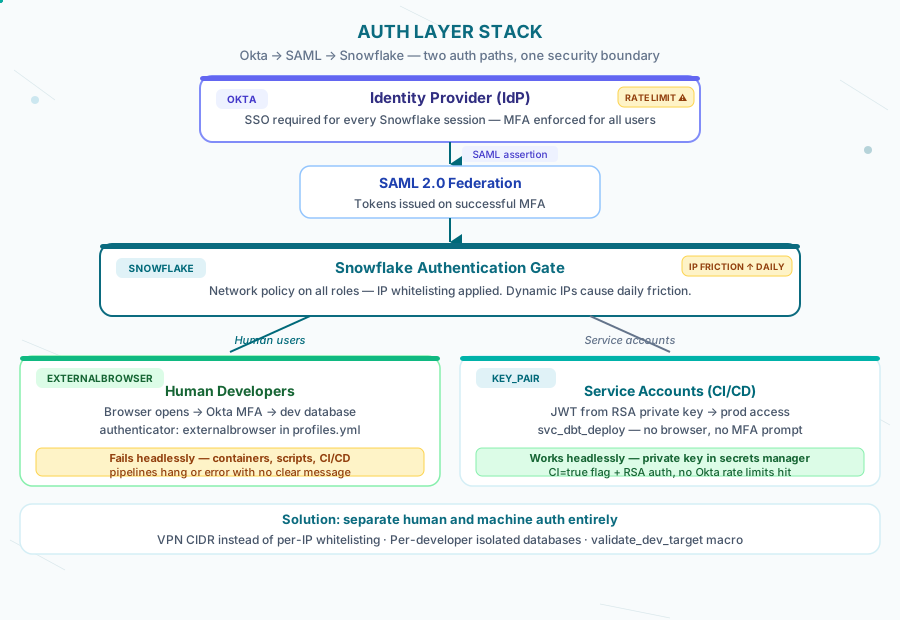
The security team’s position was clear: no password-based auth in Snowflake. Every user authenticates through Okta. Every session requires MFA. Network policies restrict access to whitelisted IPs.
-- Network policy applied to every developer role
CREATE NETWORK POLICY developer_access_policy
  ALLOWED_IP_LIST = ('10.0.0.0/8', '192.168.1.100/32')
  COMMENT = 'Restrict to corporate network + approved IPs';

ALTER USER dev_engineer SET NETWORK_POLICY = developer_access_policy;
This is reasonable configuration for a cloud security company. The problem is that developer IPs aren’t static. Remote engineers, VPN rotations, new laptops — every change meant a ticket, a request to infra, and a wait. The pattern became: try to connect → network policy error → message infra → wait → try again.
Error: IP address <current_ip> is not allowed by network policy 'developer_access_policy'.That error, received at 9am, meant losing the first hour of the day before a single query ran.
The EXTERNALBROWSER problem
Snowflake’s externalbrowser authenticator hands off to the system browser to complete SSO. For a human sitting at a laptop, it works:
# profiles.yml — what every developer had
analytics_project:
  target: dev
  outputs:
    dev:
      type: snowflake
      account: <account>
      user: <username>
      authenticator: externalbrowser
      role: TRANSFORMER_DEV
      warehouse: COMPUTE_WH
      database: DBT_DEV__{{ env_var('DBT_DEV_NAME') }}
      schema: ANALYTICS
Run dbt run, browser opens, you click through Okta, Snowflake gets the token, session starts. About 30 seconds of overhead per session. Acceptable for interactive development.
The problem surfaces when nothing is interactive.
On Snowflake’s native dbt runner — which is what we were using, not dbt Cloud — all runs happen server-side. There is no local development. The workflow was: write code → commit → push → run in Snowflake UI → check results. The UI-based runs authenticated through the session already established by the logged-in user. That worked.
Where it broke: anything automated. Scripts that queried Snowflake directly. Integration tests. Any tooling that needed a programmatic connection. externalbrowser opens a browser. A browser cannot open in a headless environment.
# What you'd expect to work — doesn't in headless context
import snowflake.connector

conn = snowflake.connector.connect(
    account='<account>',
    user='<username>',
    authenticator='externalbrowser',  # Hangs or fails — no browser available
    role='TRANSFORMER_DEV',
    warehouse='COMPUTE_WH'
)
The error isn’t always obvious. In a CI environment it just hangs until timeout. In a script it may raise a connection error with no mention of the browser requirement. You spend twenty minutes eliminating other causes before realizing the authenticator is the issue.
Rate limiting you won’t see coming
Okta Identity Engine (OIE) has rate limits on token requests. The standard Okta documentation covers these for application developers, but not specifically for Snowflake SSO flows.
What we hit: multiple developers authenticating concurrently, plus automated processes attempting externalbrowser auth, pushed against OIE’s rate limits for the org. The symptom wasn’t a clear rate limit error — it was intermittent OAUTH_TOKEN_INVALID responses from Snowflake that looked like session expiration. Three developers, same 15-minute window, same error.
Error: Authentication token is no longer valid. Please re-authenticate.We’d re-authenticate. It would work. Fifteen minutes later, same error. It took an Okta admin pulling the audit logs to surface the actual cause: token request volume from the Snowflake integration was hitting the rate limit, causing Okta to reject auth requests for the affected users. The diagnostic path was two days long because the error message pointed at Snowflake, not Okta.
The fix involved adjusting the Snowflake OAuth application settings in Okta and staggering automated processes. But getting there required knowing where to look — and Snowflake’s error messages don’t point you toward Okta.
The service account solution
Human auth and machine auth should be on completely separate paths.
-- Service account for CI/CD and automation
-- Never authenticates via browser — uses key-pair auth
CREATE USER svc_dbt_deploy
  RSA_PUBLIC_KEY = '<public_key_here>'
  DEFAULT_ROLE = TRANSFORMER_PROD
  COMMENT = 'Service account for dbt production deployments';

-- Minimal permissions scoped to what the deployment actually needs
GRANT ROLE TRANSFORMER_PROD TO USER svc_dbt_deploy;
GRANT USAGE ON WAREHOUSE DEPLOY_WH TO ROLE TRANSFORMER_PROD;
Key-pair authentication bypasses externalbrowser entirely. The service account generates a JWT, Snowflake validates the key, session starts — no browser, no MFA prompt, no Okta token request. It works headlessly and doesn’t count against your OIE rate limits in the same way.
# What actually works for automation
import snowflake.connector
from cryptography.hazmat.primitives import serialization

with open('/path/to/private_key.p8', 'rb') as key_file:
    private_key = serialization.load_pem_private_key(key_file.read(), password=None)

conn = snowflake.connector.connect(
    account='<account>',
    user='svc_dbt_deploy',
    private_key=private_key,
    role='TRANSFORMER_PROD',
    warehouse='DEPLOY_WH'
)
The service account’s private key lives in secrets management — never in the repo, never in a config file. Developers authenticate through Okta. Automation authenticates through key pairs. The security requirement is met by both paths; the friction only applies where it makes sense.
For the full picture of how we scoped roles and permissions for this pattern, see The Hidden Tax of Snowflake RBAC.
What we settled on
After running into the walls above, the architecture we landed on had three parts:
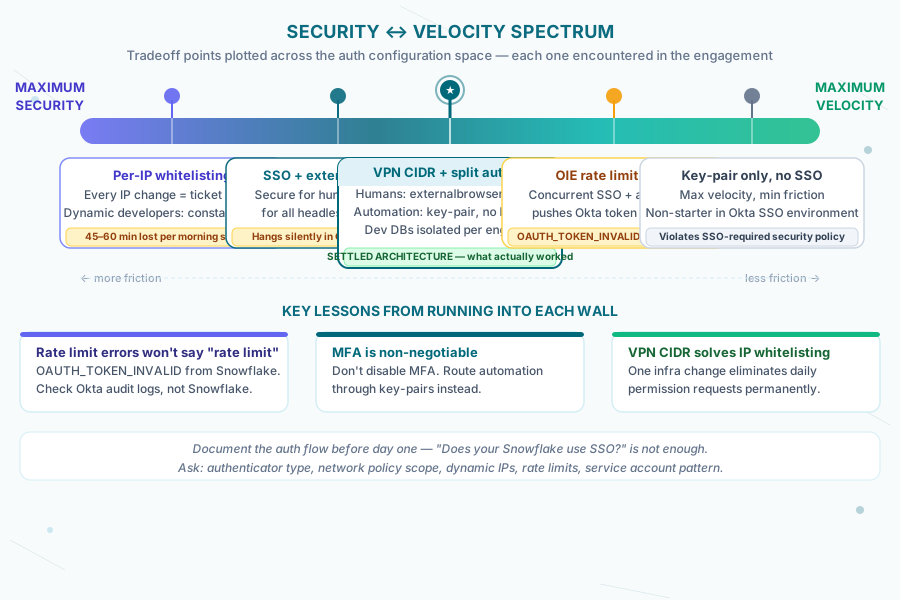
1. VPN-required network policy instead of per-IP whitelisting. Corporate VPN addresses a static CIDR range. Developer IPs stop mattering. One infra change eliminated the daily permission requests entirely.
-- Cleaner: restrict to VPN CIDR instead of individual IPs
CREATE NETWORK POLICY vpn_access_policy
  ALLOWED_IP_LIST = ('10.8.0.0/16')  -- VPN CIDR
  COMMENT = 'All dev traffic must route through VPN';
2. Separated human and machine auth.
Developers use externalbrowser + Okta MFA. Service accounts use key-pair auth. No exceptions in either direction. A developer account cannot run automated jobs; a service account cannot generate browser-based sessions.
3. Per-developer isolated databases for dev work.
Each engineer got their own isolated Snowflake database (DBT_DEV__<NAME>). No shared dev schema to coordinate around, no permission collisions between concurrent workstreams. The validate_dev_target macro prevented anyone from accidentally deploying to prod from a dev session.
-- validate_dev_target macro (simplified)
{% macro validate_dev_target() %}
  {% if target.name == 'prod' and env_var('CI', 'false') != 'true' %}
    {{ exceptions.raise_compiler_error("Production runs require CI=true") }}
  {% endif %}
{% endmacro %}
This architecture is covered in more depth in our post on running dbt natively in Snowflake without dbt Cloud.
Lessons from the walls
Document the auth flow before day one. We spent the first two weeks discovering friction that should have been caught in a pre-engagement infrastructure review. “Does your Snowflake environment use SSO?” is not enough. You need: what authenticator type, are there network policies, are developer IPs static or dynamic, are there rate limits on the Okta integration, what’s the service account pattern for automation?
Rate limit errors won’t say “rate limit.” Okta OIE errors surfaced as Snowflake auth failures with misleading messages. If you’re seeing intermittent OAUTH_TOKEN_INVALID with no reproducible pattern, check Okta’s audit logs before debugging Snowflake. The answer lives in the IdP, not the warehouse.
MFA is mandatory in a security-focused environment. We never pushed back on MFA. We pushed back on implementations that applied MFA friction to automation. The right response to “this is hard to automate” is not “disable MFA” — it’s “authenticate automation through key pairs instead.” Security posture maintained; velocity unblocked.
The infra team is not your enemy. The 8pm permission grants and the “let me know what the next error is” energy came from people who were actually trying to help while staying in their own constraints. The friction was structural, not adversarial. Naming that clearly — “here’s the structural problem, here’s the architectural fix” — unlocked cooperation faster than escalating.
Nobody documents the first two weeks of auth friction on a new analytics engagement. They document the architecture that eventually worked.
We’ve tried to document both here — because the friction is where the decisions actually get made. The clean architecture at the end is what you’d find in any best-practices post. The path to it is what we’d actually want to know before starting.
If your auth setup is slowing down your data team without making anything more secure, we can help you separate human auth from machine auth cleanly. Let’s talk architecture.
Frequently asked questions
Why does Snowflake's externalbrowser authenticator fail in CI/CD or scripts?
Externalbrowser hands off SSO to the system's browser, which doesn't exist in headless environments like CI pipelines or server-side scripts. It works fine for interactive development — about 30 seconds of overhead per session — but any automated process (integration tests, scheduled scripts, CI runs) will hang until timeout or fail with an unhelpful connection error. The fix is not to work around externalbrowser but to give automation a separate authentication path: key-pair auth via a dedicated service account, which never opens a browser and works headlessly.
Why do Okta rate limits show up as Snowflake errors?
Okta Identity Engine (OIE) enforces rate limits on token requests, but when those limits are hit, Snowflake shows an intermittent OAUTH_TOKEN_INVALID error that looks like session expiration, not a rate-limit message. On one engagement, multiple developers authenticating concurrently plus automated externalbrowser attempts pushed token request volume over OIE's limit, and it took an Okta admin pulling audit logs — a two-day diagnostic path — to find the real cause. If you see this error with no reproducible pattern, check Okta's audit logs before debugging Snowflake.
How do you separate human and machine authentication in Snowflake?
Developers authenticate through Okta with externalbrowser and mandatory MFA — no exceptions. Service accounts authenticate through key-pair auth, generating a JWT that Snowflake validates without a browser, MFA prompt, or Okta token request. A developer account can't run automated jobs and a service account can't create browser-based sessions. The private key for each service account lives in secrets management, never in the repo or a config file. This split keeps security requirements intact for humans while removing browser-dependent friction from automation entirely.
Should you whitelist individual developer IPs in Snowflake network policies?
No — per-IP whitelisting breaks the moment a developer's IP changes, which happens constantly with VPN rotations, remote work, and new laptops, and each change requires an infra ticket and a wait. The fix is a VPN-required network policy scoped to the corporate VPN's CIDR range instead of individual IPs. Because the VPN address range is static, developer IP changes stop mattering entirely, and the daily 'network policy error, message infra, wait, retry' cycle disappears in one infrastructure change.
How do you prevent developers from accidentally deploying to production from a dev session?
Give every engineer their own isolated Snowflake database (for example DBT_DEV__NAME) so there's no shared dev schema to coordinate around and no permission collisions between concurrent workstreams. Then add a dbt macro — validate_dev_target — that raises a compiler error if a run targets prod without CI=true set. That guardrail means a developer can't trigger a production run from their local or dev session, even by mistake, because the macro checks the target and the CI environment variable before allowing the run to proceed.
What should you ask about Snowflake auth before starting an engagement?
Don't stop at 'does your Snowflake environment use SSO?' — that alone misses the friction points that actually cost time. Ask what authenticator type is in use, whether network policies restrict by IP and whether those IPs are static or dynamic, whether there are rate limits on the Okta integration, and what the service account pattern is for automation. On one engagement, these questions weren't asked in the pre-engagement review, and the first two weeks were spent discovering this friction live instead of architecting around it upfront.