
The Hidden Tax of Snowflake RBAC (and How to Fix It)
- SaaS & Tech
TL;DR
On a 5-month cloud security analytics engagement, undocumented Snowflake RBAC cost 17-26 engineering hours in the first two months alone, roughly 30-45 permission blockers at 30-40 minutes each, across a team of 4 hitting missing USAGE, CREATE TABLE, or SELECT grants that each needed an admin to fix. The fix was four patterns: separating functional roles from access roles, giving the dbt service role FUTURE grants so new tables aren't invisible to downstream tools, per-developer isolated dev databases that are production-safe by design, and documenting the role hierarchy in CLAUDE.md. Setting it up right takes about a half-day and ends a recurring, compounding tax.
Key takeaway — Over a 5-month cloud security analytics engagement, permission-related blockers averaged multiple per week in the first two months — 17–26 engineering hours lost before the migration was even done. This post breaks down the role hierarchy patterns, future grant setup, and per-developer isolation that eliminated the recurring tax.
It was 8pm on a Friday. Our infra engineer had just granted the third round of permissions for the dbt service role.
“Ok, let me know what the next error is.”
Reader, there was a next error.
The short version
Snowflake RBAC is genuinely powerful. It’s also the thing that turns a productive sprint into a Friday-night Slack thread if you don’t set it up right. The four-box diagram in the docs looks simple. A service account, a CI/CD pipeline, and three developers with slightly different access requirements do not.
The cost isn’t the architecture. It’s the time: the error → ask admin → wait → retry loops that nobody tracks and everybody pays for.
This post is about that cost, and the role patterns that eliminate most of it.
”Simple role hierarchy” says the docs
Let’s revisit that phrase.
Snowflake’s official guidance shows a clean diagram: SYSADMIN owns objects, SECURITYADMIN owns roles, USERADMIN manages users, functional roles sit neatly below them. It looks like four boxes and three arrows. It implies an afternoon of setup.
What actually happens on a real engagement:
- Developer needs access to a new schema → missing
USAGEon the database - Service role runs a dbt model → missing
USAGEon the warehouse - CI/CD pipeline kicks off → missing
CREATE TABLEon the target schema - Prod deployment → missing
MODIFYon the schema the dev role does have - Sigma tries to query → missing
SELECTon the new models the service role just built
Each of these is a separate ticket, a separate Slack ping, a separate interruption for whoever holds the SECURITYADMIN hat. Over a 5-month engagement migrating a cloud security company to a modern analytics stack (dbt + Snowflake + Sigma), we tracked these interruptions. Permission-related blockers averaged multiple times per week in the first two months.
The hidden tax isn’t any single incident. It’s the accumulated overhead of a role structure that wasn’t designed for how the team actually works.
The patterns that actually work
Here’s what we landed on after enough late-night permission grants to develop opinions.
Separate functional roles from access roles
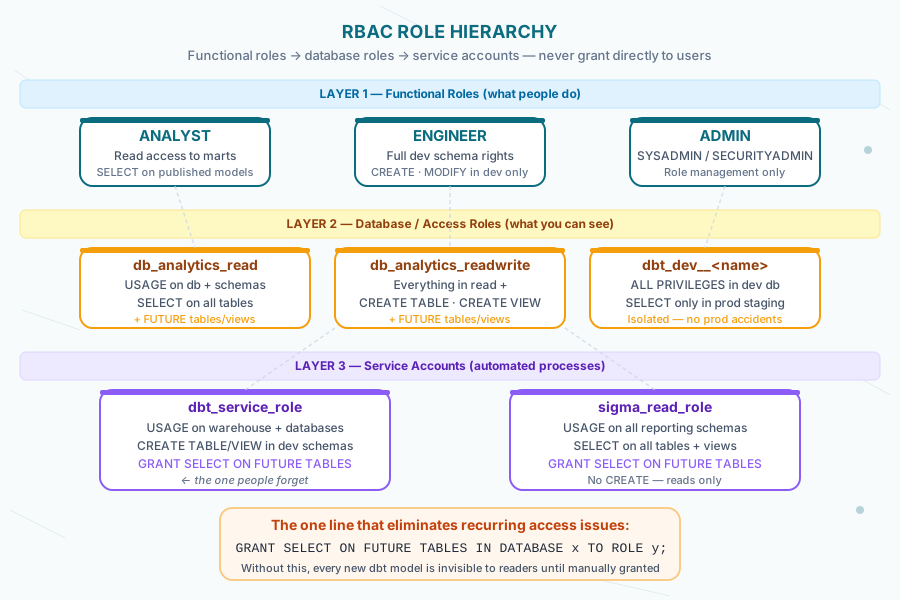
The core principle: never grant privileges directly to users. Grant them to roles, grant roles to users, and keep functional roles (what people do) separate from access roles (what they can see).
-- Access roles: what you can see
CREATE ROLE db_analytics_read;
CREATE ROLE db_analytics_readwrite;

-- Functional roles: who you are
CREATE ROLE developer;
CREATE ROLE analyst;
CREATE ROLE reporter;

-- Wire them together
GRANT ROLE db_analytics_read TO ROLE reporter;
GRANT ROLE db_analytics_readwrite TO ROLE analyst;
GRANT ROLE db_analytics_readwrite TO ROLE developer;

-- Grant privileges to access roles, not to functional roles
GRANT USAGE ON DATABASE analytics TO ROLE db_analytics_read;
GRANT USAGE ON ALL SCHEMAS IN DATABASE analytics TO ROLE db_analytics_read;
GRANT SELECT ON ALL TABLES IN DATABASE analytics TO ROLE db_analytics_read;
This gives you one place to change when you add a new schema: the access role. Functional roles don’t change. Users don’t change.
Service accounts need their own role hierarchy
The dbt service account is the most common source of Friday-night permission failures. It needs a specific, reproducible set of privileges — and those privileges need to survive a schema change, a new model, a new environment.
-- Create a dedicated service role for dbt
CREATE ROLE dbt_service_role;

-- Warehouse access
GRANT USAGE ON WAREHOUSE transform_wh TO ROLE dbt_service_role;

-- Database + schema access
GRANT USAGE ON DATABASE analytics TO ROLE dbt_service_role;
GRANT USAGE ON DATABASE analytics_dev TO ROLE dbt_service_role;

-- Schema-level create/modify for dbt to build models
GRANT CREATE SCHEMA ON DATABASE analytics_dev TO ROLE dbt_service_role;
GRANT USAGE ON ALL SCHEMAS IN DATABASE analytics TO ROLE dbt_service_role;
GRANT CREATE TABLE ON ALL SCHEMAS IN DATABASE analytics_dev TO ROLE dbt_service_role;
GRANT CREATE VIEW ON ALL SCHEMAS IN DATABASE analytics_dev TO ROLE dbt_service_role;

-- Future grants: this is the one people forget
GRANT SELECT ON FUTURE TABLES IN DATABASE analytics TO ROLE dbt_service_role;
GRANT SELECT ON FUTURE VIEWS IN DATABASE analytics TO ROLE dbt_service_role;
That last block — GRANT ... ON FUTURE TABLES — is what stops the access review cycle from recurring every time you add a model. Without future grants, every new table or view your dbt job creates is invisible to the roles that need to read it. This is the single most common source of “why can’t Sigma see the new model?” tickets.
Per-developer isolated schemas, production-safe
On this engagement we ran per-developer development databases: DBT_DEV__ALICE, DBT_DEV__BOB, and so on. Each developer had full CREATE TABLE / VIEW / SCHEMA rights in their own database and no rights in production except SELECT on the staging layer.
-- Developer role: full rights in dev, read-only in prod staging
CREATE ROLE developer_alex;

GRANT USAGE ON DATABASE dbt_dev__alex TO ROLE developer_alex;
GRANT CREATE SCHEMA ON DATABASE dbt_dev__alex TO ROLE developer_alex;
GRANT ALL PRIVILEGES ON ALL SCHEMAS IN DATABASE dbt_dev__alex TO ROLE developer_alex;

-- Read-only in prod staging for reference
GRANT USAGE ON DATABASE analytics TO ROLE developer_alex;
GRANT USAGE ON SCHEMA analytics.staging TO ROLE developer_alex;
GRANT SELECT ON ALL TABLES IN SCHEMA analytics.staging TO ROLE developer_alex;

-- Assign to user
GRANT ROLE developer_alex TO USER alex_user;
The isolation means an accidental dbt run in the wrong target (something you prevent in code with a validate_dev_target macro — see Running dbt Natively in Snowflake) hits your own dev database, not production. RBAC as a second safety layer.
Database roles: the 2024_08 bundle behavior
Snowflake introduced database roles as a way to scope grants inside a single database — useful for multi-tenant architectures or when you want Sigma-specific read grants without a proliferating account-role hierarchy.
One behavior change worth knowing: the 2024_08 BCR bundle changed how GRANT ... ON ALL SCHEMAS interacts with future schemas. If your Snowflake account opted into 2024_08 (or was auto-enrolled), a grant that previously covered new schemas may not anymore. Check your account with:
SELECT system$bcr_bundle_status('2024_08');If the output is ENABLED, audit your ON FUTURE SCHEMAS grants. The shift was subtle and broke access reviews for teams that didn’t know to look for it.
The actual troubleshooting query
When a dbt service role can’t access something, the diagnosis usually takes longer than the fix. This speeds it up:
-- What can a role actually do?
SHOW GRANTS TO ROLE dbt_service_role;

-- What roles does a user have?
SHOW GRANTS TO USER service_user;

-- What privileges exist on a specific object?
SHOW GRANTS ON SCHEMA analytics.marts;

-- Who owns what (useful when grants look right but still fail)
SELECT table_schema, table_name, table_owner
FROM information_schema.tables
WHERE table_schema = 'MARTS'
ORDER BY table_name;
The table_owner query is the one that solves the confusing case: a table that shows up in SHOW GRANTS but still throws an access error. If the table was created by the wrong role, ownership determines what the grant actually allows. The fix is GRANT OWNERSHIP ON TABLE ... TO ROLE dbt_service_role, not another GRANT SELECT. We hit this twice on the engagement — both times it looked like a grant problem until we checked who actually owned the object.
The tax you’re already paying
Let’s put a rough number on it.
Per-engineer, a permission error that requires an admin costs: ~5 minutes to diagnose and report, ~15–30 minutes wait time for the admin to respond (assuming they’re available), ~5 minutes to verify and move on. Call it 30–40 minutes per incident.
On this 5-month engagement, the first two months averaged two to three permission-related blockers per week across a team of four engineers. That’s roughly 30–45 incidents in the first phase alone. At 35 minutes each: 17–26 engineering hours lost to permission management before the team had even finished the initial migration.
That’s not counting the context switch cost. An engineer waiting on a permission grant doesn’t sit idle — they context-switch to something else, then context-switch back when the grant arrives. Research on interruption recovery puts the re-engagement cost at 15–20 minutes per context switch. The real number is higher than the raw wait time suggests.
The fix isn’t zero-cost: setting up a clean role hierarchy with future grants takes a dedicated half-day at project start. But it’s a one-time investment against a recurring tax. The math is obvious once you count it.

What we’d do differently
Invest the half-day before the first deployment. We spent the first two months paying the tax before the role hierarchy was right. A 4-hour RBAC setup sprint at project kickoff would have recovered most of that time inside the first month.
Document the role hierarchy like you document the schema. We eventually added an RBAC section to the project’s CLAUDE.md — what roles exist, who owns what, what the future grant setup covers. When a new integration (Sigma OAuth, Streamlit, Cortex Analyst) needed access, the engineer could self-serve from documentation instead of pinging the infra team. This was the change that actually ended the Friday-night Slack threads.
Use the Okta + network policy interaction as an input to role design. When Okta SSO is in play — covered in depth in our post on the Okta + Snowflake auth dance — network policies interact with role grants in non-obvious ways. Developer IPs are dynamic. Service accounts need different network policy treatment than human users. This is an RBAC design input, not just a security configuration.
Lessons learned
The Snowflake RBAC docs show the architecture. They don’t show you what happens when a dbt job runs at 2am and the service role is missing MODIFY on the schema that got recreated in the last deployment.
The hidden tax of RBAC is real, it’s measurable, and it compounds across a multi-month engagement. The cure is boring and front-loaded: functional roles, future grants, per-developer isolation, documented ownership. None of this is clever. All of it saves the Friday-night pings.
“Let me know what the next error is” is a funny line the first time. By the third time this week, it isn’t.
Frequently asked questions
How much time does bad Snowflake RBAC setup actually cost a data team?
On one 5-month analytics engagement, the first two months alone cost 17-26 engineering hours to permission management, roughly 30-45 blockers across a team of 4 engineers at about 30-40 minutes each: 5 minutes to diagnose, 15-30 minutes waiting on an admin, 5 minutes to verify. That doesn't count context-switch cost, an engineer waiting on a grant doesn't sit idle, they switch tasks and pay a 15-20 minute re-engagement cost coming back. A half-day RBAC setup sprint at project kickoff would have recovered most of that time inside the first month.
What's the difference between functional roles and access roles in Snowflake?
Access roles define what you can see, grants like USAGE on a database or SELECT on a schema's tables. Functional roles define who you are, developer, analyst, reporter, and are granted the access roles they need rather than holding privileges directly. The core principle is to never grant privileges to users or functional roles directly, only to access roles, which are then granted to functional roles. This gives you exactly one place to change when a new schema is added: the access role. Functional roles and user assignments stay untouched.
Why does a dbt service role lose access every time a new model is created?
Because of a missing FUTURE grant. Without a GRANT ... ON FUTURE TABLES (and FUTURE VIEWS) statement, every new table or view a dbt job creates is invisible to any role that needs to read it, which is the single most common source of tickets like why can't Sigma see the new model. Once future grants are set up on the dbt service role's database, downstream tools keep working automatically as the schema evolves, without a fresh grant request every time a model is added.
How should per-developer access be set up so a mistake can't hit production?
Give each developer their own isolated development database, like DBT_DEV__ALICE, with full CREATE TABLE, VIEW, and SCHEMA rights inside it, and grant them only read-only SELECT access to the production staging layer for reference, nothing more. That isolation means an accidental dbt run pointed at the wrong target lands in the developer's own database instead of production, functioning as a second safety layer on top of any code-level target validation. On one engagement this pattern, combined with a validate_dev_target macro in code, prevented accidental production writes for a team of four working in parallel.
How do you diagnose a confusing Snowflake permission error when the grants look correct?
Check object ownership, not just grants. SHOW GRANTS TO ROLE and SHOW GRANTS ON SCHEMA show what a role can do and what exists on an object, but a table can appear in SHOW GRANTS and still throw an access error if it was created by a different role than the one now trying to use it. Query information_schema.tables for table_owner to check who actually owns the object, and if it's wrong, the fix is GRANT OWNERSHIP ON TABLE, not another GRANT SELECT. This exact scenario was hit twice on one engagement before the ownership check became standard practice.