
15 Silent Bugs in a Financial BI Migration
- SaaS & Tech
- Finance, Fintech & Investment

TL;DR
A five-month migration of a cloud security company's legacy BI platform to dbt and Snowflake surfaced 15 silent bugs that had distorted revenue, ARR, and pricing data for months to years — including a 54% pricing discrepancy from an undocumented rate multiplier, a fiscal quarter that lasted 15 months instead of 3, 3,381 unclassified accounts, and Snowflake-native dbt constraints (a macro call inside PARTITION BY, an unsupported correlated subquery) nobody had documented. Twelve of the fifteen were found through reconciliation — running both systems in parallel and drilling into monthly, customer, and product-line variances — not through unit tests, which caught none of them.
Key takeaway — Migrating a cloud security company’s legacy BI platform to dbt + Snowflake surfaced 15 silent bugs that had been distorting revenue, ARR, and pricing data for months to years. A 54% pricing discrepancy. A fiscal quarter that lasted 15 months. Three Snowflake-native constraints nobody documented. Here are all fifteen, with the SQL.
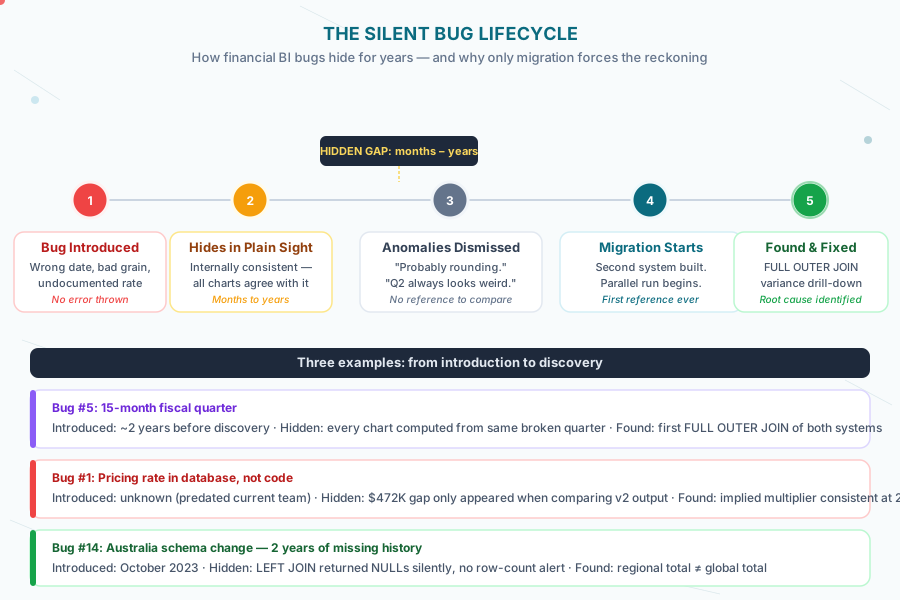
Right now, your production financial BI system probably has bugs in it. Not the kind that throw errors — those you’d know about. The quiet kind. The kind where Q2 revenue is slightly off every quarter and everyone assumes it’s a currency rounding thing. The kind that have been there so long they’ve become load-bearing. The kind that only surface when you build a second system, run it in parallel, and ask why the numbers don’t match.
We found fifteen of them during a five-month engagement migrating a cloud security company’s legacy BI platform to a modern analytics stack on dbt and Snowflake. Fifteen. In a system that had been running production financial reporting for years.
Why silent bugs are worse in financial systems
A bug in your recommendation engine means some users see less relevant content. A bug in your revenue model means Finance closes the quarter on wrong numbers. The cost of being wrong scales directly with how seriously people treat the output.
Financial data has two properties that make silent bugs particularly dangerous. First, the consumers are high-trust: Finance doesn’t run data validation before a board presentation. They trust that the system is right because it’s always been right — or appeared to be. Second, errors are often self-consistent: a bug that’s been in the system long enough gets baked into everyone’s expectations. The “right” number becomes whatever the system produces, because nobody has a reference point to challenge it.
The only way to find these bugs is to build a second system and force a reckoning. Which is exactly what a migration is. And why the migration process is, counterintuitively, the best audit your financial data will ever get.
Here are all fifteen, with the receipts.
Bug #1: The Pricing Rate That Didn’t Exist in Source Control
Hiding for: Unknown — predated the current team Impact: ~54% discrepancy on a single product line, single month
Our dbt model output for one product line’s pricing diverged significantly from the legacy system’s output for the same data, same period — with no immediately obvious cause.
We dug in. The pricing rates were real — they were being applied by the legacy system — but they existed only in the legacy system’s database. Not in its git repository. Not in any configuration file anyone could find. A 2.185x multiplier, representing a 118% price increase, had been applied at the database level with zero code change and zero documentation.
We reverse-engineered it by dividing the legacy system’s output by ours across every pricing tier until the ratio was consistent. The multiplier held. The fix was to apply it in our model. The larger lesson was harder to sit with.
The most dangerous data is the data you can’t see in source control.
-- What the legacy system was doing (reconstructed — no code existed)
-- Somewhere in a database table, not a config file, not a repo:
-- product_rate = base_rate * 2.185  ← this lived in a row in a table, not in code

-- What we found when we reconciled:
select
    product_line,
    sum(legacy_revenue) as legacy_revenue,
    sum(new_revenue)    as new_revenue,
    round(sum(legacy_revenue) / nullif(sum(new_revenue), 0), 4) as implied_multiplier
from revenue_reconciliation
where product_line = 'product_a'
  and billing_period = '2025-11-01'
group by product_line
-- Result: implied_multiplier = 2.1850
-- Every pricing tier. Consistent. A pricing change applied without a commit.
Bug #2: Three Thousand Accounts That Weren’t There
Hiding for: ~2 months Impact: Missing account classifications for October and November 2025
The October and November 2025 account data didn’t exist in the CSV feed yet when we built the initial models. We knew this, flagged it, and backfilled 3,381 accounts from the available data.
The reason this made the bug list: the legacy system had the same gap and nobody had noticed. Revenue was being calculated for billing records with no matching account classification. The accounts weren’t missing — they were just unclassified, which meant they fell into a catch-all bucket that wasn’t being audited.
-- The grain check that caught it:
select
    b.billing_period,
    count(b.account_id)                                        as billing_records,
    count(a.account_id)                                        as matched_accounts,
    count(b.account_id) - count(a.account_id)                 as unmatched
from billing b
left join accounts a on a.account_id = b.account_id
group by b.billing_period
order by billing_period desc
-- October 2025: 3,381 unmatched
-- November 2025: 3,381 unmatched
-- Every prior month: 0 unmatched
-- The legacy system had the same gap. Nobody ran this query.
Bug #3: The 2022 Revenue That Was Always a Little Wrong
Hiding for: ~3 years Impact: Systematic net revenue variance for any account with orphaned history
When we ran reconciliation for 2022 net revenue, we found a consistent variance on a subset of accounts. Not random noise — the same accounts, systematically off. The root cause: orphan account date logic.
Accounts that had been churned and reactivated had date ranges that didn’t connect cleanly. The join logic used a “first seen” date that, for these accounts, pulled from a record that predated their reactivation. Net revenue for those accounts was being calculated with the wrong effective period.
The fix was straightforward: rewrite the orphan account join to use the most recent activation date, not the minimum ever. Three years of slightly wrong numbers on a handful of accounts. Not enough to fail an audit, enough to make budget vs. actuals conversations confusing every time those accounts came up.
Bug #4: Duplicate Rows in Monthly Revenue
Hiding for: Unknown Impact: Revenue inflation wherever plan names had multiple plan IDs
The grain of the legacy monthly revenue model was supposed to be one row per account per plan per month. It wasn’t. The model included plan_id in its grain definition, and some plan_name values mapped to multiple plan_id values — multiple versions of the same plan tracked separately in the source system.
Result: revenue for those plans appeared twice. Or three times. However many plan_id values existed for that plan_name.
-- The bug: grain included plan_id, which has multiple values per plan_name
select
    account_id,
    plan_name,
    plan_id,      -- ← this was in the GROUP BY. it shouldn't be.
    billing_month,
    sum(revenue) as revenue
from billing
group by account_id, plan_name, plan_id, billing_month

-- The fix: deduplicate before aggregating
with deduped as (
    select
        account_id,
        plan_name,
        billing_month,
        sum(revenue) as revenue
    from billing
    group by account_id, plan_name, billing_month
)
select * from deduped
-- Now one row per (account, plan_name, month). Revenue stops being inflated.
Bug #5: The Fiscal Quarter That Lasted 15 Months
Hiding for: ~2 years Impact: Incorrect quarterly ARR values, incorrect quarter labels in reporting
A fiscal quarter definition that spanned 15 months instead of 3 — the full story of how we found it, replicated it intentionally, and then fixed it in a separate PR is in When the Right Answer Is Wrong Code.
Bug #6: The Dashboard Filter That Only Applied to One Page
Hiding for: Unknown — likely since the dashboard was built Impact: Users filtering by time period were only filtering the first page
This one isn’t a SQL bug — it’s a dashboard configuration bug, which means it had been visible to every user of the legacy system and nobody had noticed, because the other pages looked right.
A global filter control had its scope set to the current page only, not all pages. Users selecting a date range believed they were filtering the full dashboard. Three of the four pages ignored the filter entirely.
The fix: set filter scope to “all pages.” Thirty seconds. The bug had been there for as long as the dashboard existed.
Bug #7: The Quarter That Disappeared
Hiding for: Not long — caught during development Impact: Q1–Q3 FY26 data vanished from quarterly ARR entirely
This one surfaced fast, which was fortunate, because it was catastrophic in its effect: running quarterly ARR and getting no data for three quarters.
The cause: a dbt macro call inside a PARTITION BY clause. In Snowflake’s native dbt executor, this compiles without error. The query runs. The partitioning is wrong. The fiscal quarter calculations produce garbage, and the QUALIFY ROW_NUMBER() = 1 filter on top of them eliminates almost everything.
-- What we wrote (compiles fine, wrong results in Snowflake native):
select
    account_id,
    revenue,
    {{ fiscal_quarter_macro('billing_date') }} as fiscal_quarter
from billing
qualify row_number() over (
    partition by account_id, {{ fiscal_quarter_macro('billing_date') }}
    --                        ^^^ macro call in PARTITION BY = silent failure
    order by billing_date desc
) = 1

-- Fix: inline the calculation, no macro in window functions
select
    account_id,
    revenue,
    case
        when billing_date >= '2025-08-01' then 'Q3FY26'
        when billing_date >= '2025-05-01' then 'Q2FY26'
        -- ... etc
    end as fiscal_quarter
from billing
qualify row_number() over (
    partition by account_id,
        case
            when billing_date >= '2025-08-01' then 'Q3FY26'
            -- inlined, not a macro call
        end
    order by billing_date desc
) = 1
The Snowflake native dbt documentation says nothing about this. I have trust issues now.
Bug #8: The Elegant Macro Pattern That Snowflake Rejected
Hiding for: Not long — caught during FY27 sprint Impact: All temporal lookup macros broken at runtime
Standard dbt pattern for temporal lookups: correlated subquery. Clean. Readable. Generates naturally. Completely unsupported in Snowflake’s native dbt executor.
The macros compiled. They looked right in the DAG. They failed at runtime with cryptic error messages that didn’t immediately point to the correlated subquery as the problem. By the time we diagnosed Batch 4, we’d wasted a day.
The fix was architectural: every temporal lookup rewritten as JOIN + QUALIFY. Not just a workaround — the new pattern was measurably faster in Snowflake’s execution engine. But discovering it was not a great afternoon.
-- What worked everywhere else (fails at runtime in Snowflake native):
select
    t.*,
    (
        select r.rate
        from pricing_rates r
        where r.effective_date <= t.billing_date
        order by r.effective_date desc
        limit 1
    ) as applied_rate
from billing t

-- The Snowflake-native replacement:
select t.*, r.rate as applied_rate
from billing t
left join pricing_rates r
    on r.effective_date <= t.billing_date
qualify row_number() over (
    partition by t.billing_id
    order by r.effective_date desc
) = 1
-- Faster. But we had to learn it the hard way.
Bug #9: The CSV That Used Different Names Than the Database
Hiding for: ~1 month Impact: Revenue attribution failures for a major technology partner’s accounts
A billing data CSV from a major technology partner used different plan name prefixes than the corresponding records in the legacy source tables. Not different values — the same plans, same accounts, just prefixed differently in the CSV than in the database.
The JOIN failed silently: records that didn’t match fell into a NULL bucket rather than throwing an error. Revenue for those accounts was unattributed. The fix required a normalization layer that stripped and standardized prefixes before any join logic ran.
-- The mismatch (illustrative — names anonymized):
-- In legacy system: 'PRODUCT_detection_advanced'
-- In CSV:       'detection_advanced'

-- The silent failure:
select c.*, p.account_classification
from csv_billing c
left join legacy_accounts p
    on c.plan_name = p.plan_name  -- ← fails silently, returns NULL
-- No error. Just NULL account_classification for every CSV record.

-- The fix: normalize before joining
select c.*, p.account_classification
from csv_billing c
left join legacy_accounts p
    on regexp_replace(c.plan_name, '^PRODUCT_', '') = p.plan_name
Bug #10: The Revenue Columns in Different Units
Hiding for: Caught early in v2 development Impact: Unit mismatch between v1 and v2 validation causing false variance alarms
When we built the v2 revenue models, reconciliation showed a consistent 1000x discrepancy across all records. Not a logic error — units. The v1 model reported revenue in dollars. The v2 model, following what seemed like a sensible default from source column naming, reported in millicents.
Not a subtle bug. Found immediately when the first reconciliation showed v2 was 1000x larger than v1 across every single row. Fixed in minutes. Made the list because this is one of the most common migration mistakes in financial systems, and “let me just check the units” is a step that gets skipped under time pressure.
Bug #11: The UNION ALL That Created Its Own Duplicates
Hiding for: Caught during v2 development Impact: Duplicate ARR rows whenever a customer appeared in both pre- and post-cutover data
To handle a schema change that occurred in October 2025, we built the ARR v2 model using a UNION ALL of pre-cutover and post-cutover data. The UNION ALL was correct. The issue: some customer records appeared in both the pre-cutover and post-cutover tables during the transition period, because the cutover wasn’t instantaneous.
Result: customers active during the transition window appeared twice in the unioned output. ARR for those customers doubled. No error, no warning — just inflated ARR for a specific cohort of customers during a specific date range.
-- The bug: UNION ALL without checking for overlap
select account_id, billing_date, arr_value, 'pre_cutover' as source
from arr_schema_v1
where billing_date < '2025-10-01'

union all

select account_id, billing_date, arr_value, 'post_cutover' as source
from arr_schema_v2
where billing_date >= '2025-10-01'
-- Problem: what if arr_schema_v2 also has records before 2025-10-01?
-- (It did. For some accounts. The cutover had overlap.)

-- Fix: add explicit deduplication at the final step
with unioned as (
    -- same union as above
),
deduped as (
    select *
    from unioned
    qualify row_number() over (
        partition by account_id, billing_date
        order by case when source = 'post_cutover' then 1 else 2 end
    ) = 1
)
select * from deduped
Bug #12: The Discount Priority That Resolved in the Wrong Order
Hiding for: Unknown — present in legacy system Impact: Incorrect net revenue for accounts with overlapping discount rules
The discount logic had a priority system: when multiple discount rules applied to an account, the higher-priority rule was supposed to win. The applies_to priority wasn’t resolving correctly — a lower-priority rule was winning for a specific class of account configurations.
The fix required rebuilding the priority resolution as an explicit ROW_NUMBER() ordered by priority rank, rather than relying on implicit ordering from how the rules happened to be evaluated. Subtle, hard to test without knowing the exact account configurations where it manifested, and exactly the kind of thing that produces “something seems off with the numbers for these specific accounts” conversations every quarter.
Bug #13: The Regional Audit With Overlapping Date Ranges
Hiding for: Caught during data audit development Impact: Double-counting in regional revenue audits for the transition period
When building a regional data audit model, we constructed it by unioning regional data for different time periods. The date ranges overlapped. Records from the boundary month appeared in both regions’ count.
Not subtle once you looked at it. The regional totals didn’t sum to the global total. By exactly the volume of the overlapping month, for exactly the affected regions. The fix was date range cleanup — ensuring the union covered every date exactly once.
-- The bug: overlapping date ranges in a regional union
select 'apj' as region, account_id, revenue from apj_data
    where billing_date between '2024-01-01' and '2024-06-30'
union all
select 'apj' as region, account_id, revenue from apj_data_updated
    where billing_date between '2024-06-01' and '2024-12-31'
--                                  ^^^^ June appears in both ranges

-- Fix: non-overlapping ranges
select 'apj' as region, account_id, revenue from apj_data
    where billing_date < '2024-06-01'
union all
select 'apj' as region, account_id, revenue from apj_data_updated
    where billing_date >= '2024-06-01'
Bug #14: Australia Changed Its Schema and Didn’t Tell Anyone
Hiding for: ~2 years (since October 2023) Impact: All Australian historical data missing from staging model
In October 2023, the Australia ([region-code]) region migrated from a flattened schema format to a structured [schema-version] format. The staging model had been updated to handle [schema-version]. It no longer handled the pre-migration flat format.
Every query that included historical Australian data silently excluded everything before October 2023. Not an error. Not a warning. Just a staging model with a WHERE clause that only matched the new format, and a LEFT JOIN that returned NULLs for the old one.
The fix: a hybrid staging model that UNION ALLs both formats, with an explicit October 2023 cutover date. You can’t always trust that source systems have clean, monotonic schema evolution. Reality is messier than the schema diagram.
Bug #15: The NULL Account Type That Wasn’t Anyone’s Fault
Hiding for: Caught late in engagement Impact: Missing account type classification on a subset of records
The final bug: a LEFT JOIN between billing records and the accounts classification table wasn’t matching all records. Some billing accounts existed in the CSV model but not in the accounts reference table, leaving account_type as NULL.
Not a logic error in the join. Not a data quality problem in the strict sense. A coverage problem: the accounts table was built from one data source, the billing CSV was a different data source, and the coverage wasn’t complete. The fix was identifying the unmatched records and either backfilling the missing accounts or adding an explicit catch-all for known unclassifiable records.
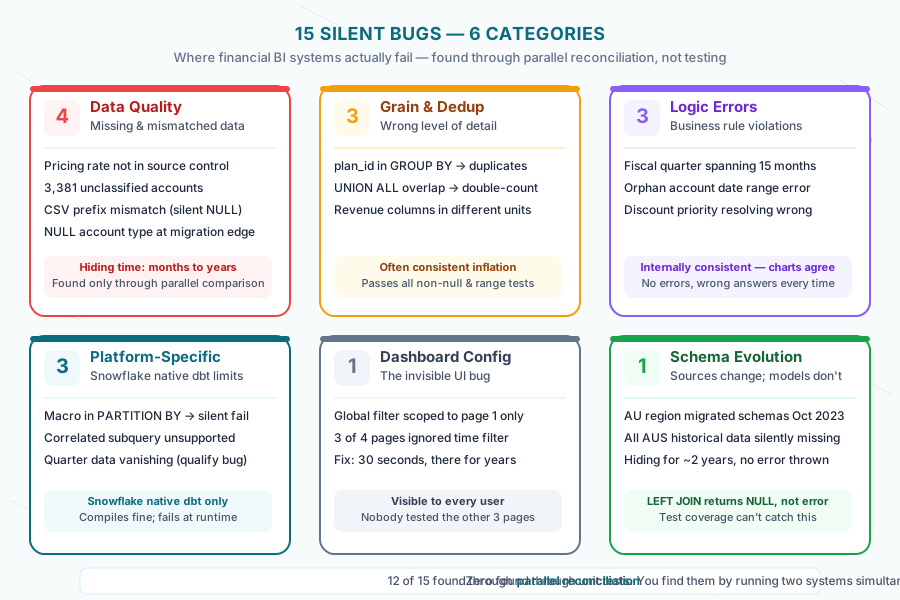
The meta-pattern: 15 bugs, 6 categories, 1 methodology
Group these fifteen bugs and you get a picture of where financial BI systems actually fail:
| Category | Count | What goes wrong |
|---|---|---|
| Data quality / missing data | 4 | Accounts, rates, coverage gaps |
| Grain and deduplication | 3 | Wrong level of detail, duplicate rows, unit mismatches |
| Platform-specific constraints | 3 | Snowflake native dbt limitations |
| Logic errors | 3 | Date boundaries, priority resolution, fiscal calendars |
| Dashboard configuration | 1 | Filter scope — the invisible one |
| Schema evolution | 1 | Sources change; staging models don’t always follow |
Twelve of the fifteen were found through reconciliation — running both systems in parallel and systematically drilling down wherever the outputs disagreed. The other three were caught during development when something looked wrong. None of them were found through unit tests. None of them would have been.
The methodology that surfaces these bugs is described in full in our post on validating a financial migration to 0.002% accuracy. The short version: run both systems, compare outputs at multiple grains — monthly totals, then by customer, then by product line. A variance that disappears when you drill down is a grain issue. A variance that persists at every level is a logic error. The hierarchy cuts debugging time significantly.
We didn’t find these bugs because we’re especially good at finding bugs. We found them because we were looking. And we were looking because we had a second system to compare against.
That’s the uncomfortable truth: if you’ve never migrated your financial BI system, you’ve never had a reference. You’ve been trusting numbers that have never been externally validated. You probably have some version of several of these bugs. Not maybe. Probably.
The question is whether you find them during a controlled migration or during an audit.
Frequently asked questions
How do you find silent bugs without migrating the entire system?
The lightweight version of the methodology is a dual-model comparison: build a new version of a critical model alongside the existing one, run both on the same historical data, and use a FULL OUTER JOIN to compare outputs at multiple grains. You don’t need a full migration to apply this — any model you suspect is wrong can be interrogated this way. The key is using FULL OUTER JOIN (not INNER JOIN) so that missing records surface as NULLs rather than disappearing from the comparison entirely. Start with your highest-stakes models: ARR, net revenue, whatever feeds the board deck.
Why don’t standard tests catch these bugs?
Unit tests validate that code does what you expect it to do. Silent bugs are cases where the code does what you expected, but you expected the wrong thing. Bug #5 (the 15-month quarter) had been wrong so consistently that everyone’s expectations had calibrated to it — the “right” output was the wrong output, because the bug predated anyone’s frame of reference. Schema tests, not-null checks, and range assertions can’t catch that. Only a comparison against an independent reference system can.
Should we be worried about these specific bugs in our dbt + Snowflake setup?
The platform-specific bugs (Bugs #7 and #8) are Snowflake native dbt constraints that catch a lot of teams. If you’re running Snowflake-native dbt, test for correlated subquery support and macro calls in PARTITION BY clauses before you go deep into a sprint. The other bugs are general financial BI problems that aren’t platform-specific — grain errors, dedup issues, and undocumented rate changes happen in every stack. The Snowflake-native patterns are covered in more depth in our post on intentional bug replication.
How long does it take to find bugs like these?
Finding them took three months of parallel running and systematic reconciliation. Fixing them ranged from thirty seconds (Bug #6, the dashboard filter scope) to several days (Bug #8, the architectural shift from correlated subqueries to JOIN + QUALIFY). The long tail isn’t the fixes — it’s the diagnosis. Most of these bugs have non-obvious root causes that look like something else at first. The 2022 orphan account variance looked like a data freshness issue. The 15-month fiscal quarter looked like a timezone problem. Building a systematic drill-down methodology (monthly → customer → product line) cuts the time from “something is wrong” to “here is exactly why” significantly.
How do you prevent these bugs from being reintroduced after the migration?
Three things: documentation that travels with the model (dbt persist_docs makes this visible in Snowflake’s UI), a grain check that runs as part of CI (a query that asserts one row per expected key combination, failing the build if it finds duplicates), and seed files for anything that currently lives as a hardcoded value in SQL. The undocumented rate (Bug #1) would have been preventable if the rate had lived in a seed file with a change history. It lived in a database row with no commit history. Both are queryable; only one is auditable.
The fifteen bugs we found were in a well-maintained system, built by a competent team, that had been running production financial reporting for years.
That’s the point. These aren’t the result of bad engineering. They’re the result of systems that were never forced to defend themselves against a comparison. The migration was the comparison.
We found these because we were looking. The methodology that made the looking systematic is the whole point.
The scope growth that led us to discover bugs across all seven domains is its own story. The testing framework that would have caught these bugs before they went live is in dbt Testing Best Practices for Financial Data. These fifteen defects sit alongside the migration’s scope, timeline, validation, and ROI numbers in the dbt migration benchmark.
If your financial BI system has never been migrated, it almost certainly has bugs nobody has found yet. We know how to surface them. Book a migration assessment.