
Financial Migration Validation: 0.002% Accuracy
- SaaS & Tech
- Finance, Fintech & Investment
TL;DR
A financial migration from legacy BI to dbt + Snowflake targeted under 0.01% variance and landed at 0.002% — under $2,000 of variance on a multi-year revenue dataset — using dual-model comparison: building the same output two independent ways and running FULL OUTER JOIN variance queries at monthly, plan, and customer grain. The systematic reconciliation, not unit tests, is what surfaced all 15 bugs found during the migration, including a 118% undocumented price increase with zero git history. The core discipline was parity-first: replicate legacy behavior — bugs included — to zero variance before fixing anything, so every remaining variance has one unambiguous cause.
Key takeaway — Migrating a cloud security company’s revenue analytics from a legacy BI platform to dbt + Snowflake, we ran dual models simultaneously and compared them at monthly, plan, and customer grain using FULL OUTER JOIN variance queries. The process found 15 bugs. Our target was under 0.01%. We hit 0.002% — well under our 0.01% target.
The first full comparison run came back significantly off.
Same data. Same period. Two systems. Hundreds of thousands of dollars apart. At that moment, “close enough” stops being a reasonable standard and starts being a liability.
That discrepancy wasn’t a migration error. It was a discovery — a 118% undocumented price increase applied at the database level with zero git history. The migration hadn’t introduced the problem. It had exposed it.
This is what financial data migration validation is actually for. Not confirming that new code matches old code. Confirming that new code matches old behavior — and then deciding, with explicit sign-off, what to do about the places where old behavior was wrong.
We finished the migration with a total variance of under $2,000. That’s 0.002%. Here’s how.
Why financial migration validation is different
Most ETL validation checks that data arrived. Financial migration validation checks that calculations match.
That’s a different problem. A row count check tells you nothing about whether a pricing tier was applied correctly. A null check won’t catch a fiscal quarter macro that makes Q2 span 15 months instead of 3. A schema test won’t flag a regional multiplier that was applied to the wrong product line.
The standard toolbox — dbt tests, row counts, schema validation — is necessary but not sufficient. What you need on top of it is a parallel system: the legacy output running simultaneously with the new output, compared row by row at every grain that matters. Not just “does the total match,” but “does it match at the month level, the plan level, the customer level, and does it match in a way that tells you where a variance is coming from?”
There’s also a discipline question. The temptation on a migration is to fix known bugs as you go. That’s the wrong order. Fix-and-migrate simultaneously means every variance is ambiguous: is this a migration error, or did I intentionally change behavior? You can’t tell. The right sequence is parity first — replicate the legacy system exactly, bugs included — validate to near-zero variance, then fix the bugs in separate, reviewed PRs where the intent is explicit.
We ran four parallel validation streams throughout the migration:
- Pricing rates validation — seed values versus hardcoded legacy CASE statements
- Revenue model validation — v1 versus v2 across four major fact tables
- Input table validation — seed data versus the legacy BI platform’s reference tables
- Data quality reconciliation — deduplication diagnostics, time series anomaly investigation
Stream 4 deserves a specific callout: we investigated an 18.1% month-over-month spike in usage data. Six diagnostic queries later, the answer was legitimate growth — organic growth in one region — not re-ingestion. Without that investigation, we would have either panicked or ignored it. Neither is correct.
Solution: dual-model comparison
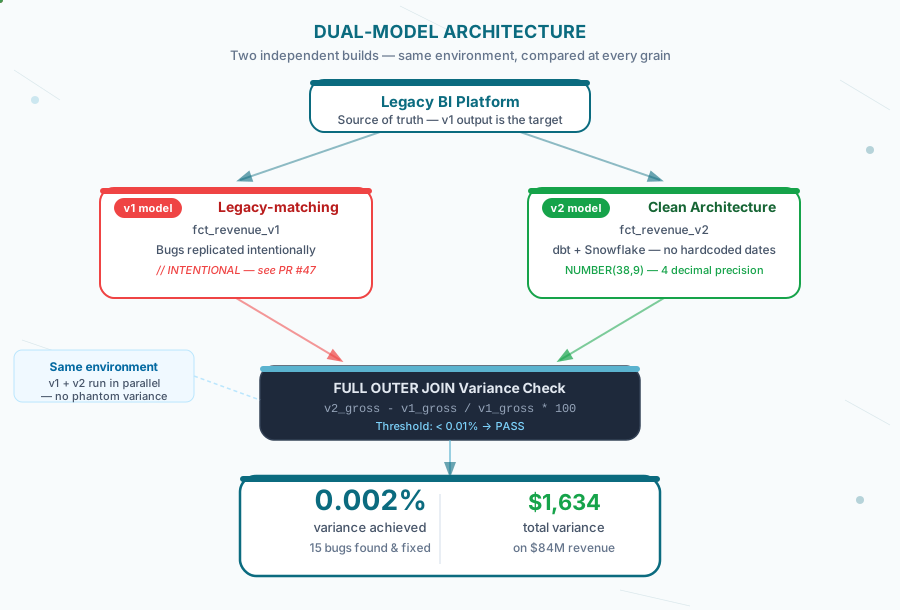
The core methodology is simple to state and requires discipline to execute. Build the same output two independent ways. Run both in the environment simultaneously. Compare at every grain level. Any variance above threshold is a bug until proven otherwise.
The repeatable process, for teams running a similar migration:
Establish a source-of-truth baseline first. The legacy system is v1. It is what it is — bugs and all. Its output is the target. Before writing a single v2 model, ensure you can query v1 reliably and repeatably. If v1 output differs between runs, fix that first.
Build v2 models in the same environment. Not a separate dev environment — the same one. This is non-negotiable: environment differences (timezone handling, type casting, numeric precision) create phantom variances that obscure real ones.
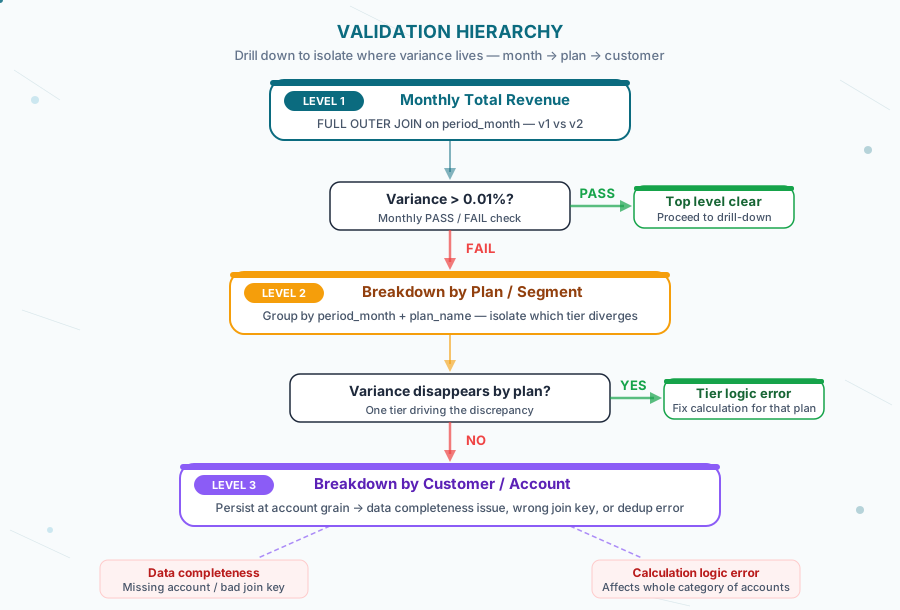
Run the FULL OUTER JOIN variance query at the highest grain first. Monthly total revenue, v1 versus v2. If this passes, drill down. If it fails, understand why before drilling down — it’s possible a single root cause explains everything. Then drill by plan, then by customer. A variance that disappears when you break it out by plan is a calculation issue in a specific tier. A variance that persists at the customer grain is a data completeness issue — a missing account, a wrong join key, a deduplication error.
Set a threshold and hold it. Our threshold was < 0.01%. Every model comparison got a PASS or FAIL. No judgment calls, no “close enough given the complexity.” FAIL means you debug before proceeding. Zero-variance is worth investigating too — exact 0.00% on every period can mean the models are genuinely identical, or it can mean they’re drawing from the same source and haven’t diverged yet. Know which one you’re looking at.
Document every variance resolution. When you find a variance and fix it, record what it was, what caused it, and how you resolved it. On a long migration, this log becomes the audit trail that Finance and compliance will want.
Technical depth: the validation queries
The core comparison query uses a FULL OUTER JOIN, not an INNER JOIN. This matters. An INNER JOIN would silently drop any month where one system has data and the other doesn’t — exactly the class of error you’re trying to catch.
with v1 as (
  select period_month, sum(total_gross_revenue) as v1_gross
  from fct_revenue_v1
  group by period_month
),
v2 as (
  select period_month, sum(total_gross_revenue) as v2_gross
  from fct_revenue_v2
  group by period_month
)
select
  coalesce(v1.period_month, v2.period_month) as period_month,
  v1_gross, v2_gross,
  v2_gross - v1_gross as absolute_diff,
  case when v1_gross = 0 then 0
    else round((v2_gross - v1_gross) / v1_gross * 100, 4)
  end as percent_diff_pct,
  case when abs(percent_diff_pct) < 0.01 then 'PASS' else 'FAIL' end as status
from v1
full outer join v2 on v1.period_month = v2.period_month
order by period_month
ROUND(..., 4) tracks variance to 0.0001%. Our threshold was 0.01%, which means anything above 0.0001% shows up with meaningful precision. A $100 discrepancy on a multi-year revenue dataset is visible in this query.
When the top-level query shows a FAIL, drill down by plan:
with v1 as (
  select period_month, plan_name, sum(total_gross_revenue) as v1_gross
  from fct_revenue_v1
  group by period_month, plan_name
),
v2 as (
  select period_month, plan_name, sum(total_gross_revenue) as v2_gross
  from fct_revenue_v2
  group by period_month, plan_name
)
select
  coalesce(v1.period_month, v2.period_month) as period_month,
  coalesce(v1.plan_name, v2.plan_name) as plan_name,
  v1_gross, v2_gross,
  v2_gross - v1_gross as absolute_diff,
  case when v1_gross = 0 then 0
    else round((v2_gross - v1_gross) / v1_gross * 100, 4)
  end as percent_diff_pct
from v1
full outer join v2 using (period_month, plan_name)
where abs(v2_gross - v1_gross) > 0.01
order by abs(absolute_diff) desc
The WHERE abs(...) > 0.01 threshold filter cleans up the output. You want to see variances worth investigating, not every plan with a rounding difference of $0.004.
To run all model pairs at once, the comprehensive PASS/FAIL summary:
-- Summary with PASS/FAIL per model
select
  model_name,
  periods_compared, min_period, max_period,
  max_gross_diff_pct,
  case when max_gross_diff_pct < 0.01 then 'PASS' else 'FAIL' end as gross_status,
  max_net_diff_pct,
  case when max_net_diff_pct < 0.01 then 'PASS' else 'FAIL' end as net_status
from validation_summary
order by max_gross_diff_pct desc
For reference table validation — pricing seeds versus legacy rate tables — the anti-join pattern catches row-level discrepancies that aggregate comparisons would miss:
select 'IN SEED NOT IN LEGACY' as diff_direction, s.*
from dbt_dev.discount_rates s
where not exists (
  select 1 from input_db.discount_rates i
  where s.segment = i.segment
    and s.plan_name = i.plan_name
    and s.discount_multiplier = cast(i.discount_multiplier as number(5,4))
    and equal_null(s.notes, i.notes)
)
union all
select 'IN LEGACY NOT IN SEED' as diff_direction, i.*
from input_db.discount_rates i
where not exists (
  select 1 from dbt_dev.discount_rates s
  where i.segment = s.segment
    and i.plan_name = s.plan_name
    and cast(i.discount_multiplier as number(5,4)) = s.discount_multiplier
    and equal_null(i.notes, s.notes)
)
equal_null() handles the case where both sides are NULL — standard = would fail on null-versus-null comparisons and generate false positives. The explicit cast(... as number(5,4)) handles type mismatch between seed inference and legacy column types.
This query ran against every seed file before any downstream model validation. Our pricing rates comparison came back at 0.00% — exact match — once all seeds were correctly typed.
Lessons learned
Parity first, correctness second — always. We found a fiscal quarter definition that spanned 15 months instead of 3. The right response was to replicate the bug, achieve parity, then fix it in a separate PR. The full story is in When the Right Answer Is Wrong Code. If you correct and validate in the same change, you cannot tell whether a remaining variance is a migration error or an intentional improvement. Separate them. Every time.
The validation methodology is also the bug-finding methodology. We found 15 bugs during the migration — data quality issues, grain problems, platform-specific failures, schema evolution gaps, logic errors. None of them were found by unit tests. All of them were found through reconciliation. The systematic comparison of v1 and v2 at multiple grains is the test that catches what schema tests don’t. See 15 Silent Bugs We Found Migrating a Financial BI Platform for the full breakdown.
NUMBER(38, 9) everywhere, no exceptions. Floating-point columns in revenue models are a silent audit risk. The error doesn’t appear immediately — it accumulates as rounding differences across thousands of rows until Finance asks why Q3 close is off by $8,000. We documented this as a hard rule from day one: all financial columns use NUMBER(38, 9), all variance calculations round to four decimal places.
Investigate spikes before you assume they’re problems. The 18.1% time series spike could have been a real data quality issue or legitimate business growth. We ran six diagnostic queries before concluding it was legitimate growth. The cost of that investigation was a few hours. The cost of misclassifying legitimate growth as a bug — or a bug as legitimate growth — is much higher. Don’t treat data quality questions as separate from migration questions. They’re the same question: does the new system accurately represent what happened?
Frequently asked questions
Is 0.002% actually good enough for financial data?
It depends on the absolute dollar amount and the downstream use. On a multi-year revenue dataset, 0.002% is under $2,000 — less than the rounding in most manual forecasts. Both figures are well within typical financial reporting tolerances. The more important question is whether you understand where the variance comes from. Unexplained variance at 0.001% is worse than explained variance at 0.05%. Know what’s driving every number.
What if you can’t build two models simultaneously?
The dual-model approach requires running both systems in the same environment, which isn’t always possible. If you can’t run v1 and v2 in parallel, the fallback is exporting known-good snapshots from the legacy system before migration — period-end totals at each grain level — and validating the new system’s output against those snapshots. You lose some diagnostic depth (you can’t drill down dynamically), but you preserve the fundamental check: new output must match known-good output within tolerance.
How do you handle cases where the legacy system has bugs you want to fix?
The parity-first discipline answers this. First, build a v2 that replicates v1 exactly — bugs included. Validate to near-zero variance. Then, in a separate branch with explicit sign-off, build the corrected version. Run a three-way comparison: legacy, v2 (parity), and v2 (corrected). The parity model tells you what migrating without changes would have produced. The corrected model tells you what you actually want. Document which bugs were fixed and why. See When the Right Answer Is Wrong Code: Intentional Bug Replication for a detailed walkthrough of this pattern.
How many grain levels do you need to validate?
At minimum: total by month, breakdown by your primary categorical dimension (plan, product line, or segment), and breakdown by account/customer. Three levels. The first catches gross errors. The second isolates which category is driving them. The third tells you whether it’s a calculation problem (affects a whole category) or a data completeness problem (specific accounts missing or duplicated). If your business has more grain complexity than that — regional multipliers, contract types, fiscal segments — add grain levels accordingly. Every dimension that can cause a calculation to differ between systems is a grain level worth validating.
How long does running this validation framework actually take?
Writing the queries the first time: a day, maybe two, for a migration of moderate complexity. Running them and interpreting results: two to four hours per validation cycle. The ongoing cost is low — the queries rerun in minutes and the patterns reuse across models. The upfront investment pays back the first time validation catches a bug that would have reached production. On this migration, it caught 15 of them.
Closing
The 0.002% accuracy figure is a result. Getting there required parallel models, hierarchical grain validation, parity-first discipline, and threshold-based PASS/FAIL — none of which are complicated, all of which require consistent execution.
Financial migrations don’t fail because the SQL was wrong. They fail because the validation wasn’t thorough enough to catch where the SQL was subtly wrong in a way that looked right until the quarterly close.
Build both models. Compare everything. Investigate every variance. The framework is straightforward. The discipline to follow it is what separates migrations that land cleanly from ones that surface problems six months later.
For the full engagement story, see the case study. For how we managed the technical sprint that produced these models, see Why Claude Code Breaks Down at 60% — and the System That Let Us Deliver Anyway. For how to build reconciliation tests and the three other test categories into your dbt CI pipeline, see dbt Testing Best Practices for Financial Data.
Planning a data migration where the numbers have to hold up to audit? We’ve built the validation methodology to get you there. Let’s talk methodology.