
86 Charts to 22 Pages: Keep/Merge/Kill Framework
- SaaS & Tech

TL;DR
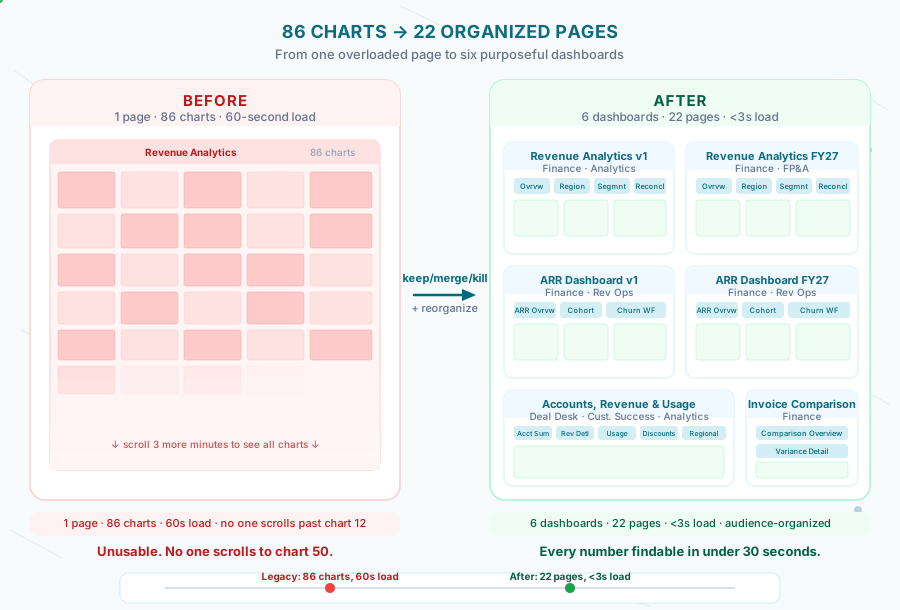
A cloud security company's legacy revenue dashboard had grown to 86 charts on one page with 60-second load times, forcing Finance to scroll three minutes for a number. Applying a keep/merge/kill decision framework, organizing by audience instead of data domain, and fixing global filter scope consolidated it into 6 dashboards across 22 pages, load times under 3 seconds, any number findable in under 30 seconds. The harder half was stakeholder management: announcing the kill list two weeks before cutover, per-audience walkthroughs, and a 90-day redirect map kept the transition from generating a wave of post-launch complaints.
Key takeaway — 86 charts on one page. 60-second load times. Finance scrolling for three minutes to find a number. After applying a structured keep/merge/kill decision framework and organizing by audience rather than data domain, we delivered 6 dashboards across 22 pages — with load times under 3 seconds and a Finance team that could find any number in under 30 seconds. The technical work was the easy part. The hard part was stakeholder management: you are, functionally, deleting things people use.
The first time a finance analyst opened the legacy dashboard, they had to scroll for three minutes before they found the chart they needed. Not because the data wasn’t there. Because it was all there — every chart anyone had ever requested, stacked on a single page, in the order someone added them.
86 charts. One page. No grouping logic that survived contact with a new stakeholder.
By the end of the engagement, we had 6 dashboards organized across 22 pages. The Finance team could find a number in under 30 seconds. No one filed a request to add charts back.
What “one dashboard” actually looks like
A cloud security company had been running revenue analytics in a legacy BI tool for five years. Over that time, the dashboard had accumulated charts the way a code repo accumulates commented-out code: gradually, through reasonable decisions, each of which seemed fine in isolation.
Revenue by region. Revenue by region, but only external accounts. Revenue by region, but only for the current quarter. Revenue by region, filtered to the top five accounts. Same underlying data. Four variations. Each added because someone needed a specific slice and it was faster to add a new chart than to build a filter.
The result was a single page with 86 charts. Loading time was measured in minutes, not seconds.
The load time made this worse in a specific way: when a dashboard takes 60 seconds to load, nobody scrolls past the first few visible charts. Everyone built their mental model of “where the data lives” around whatever was visible on first render. Charts below the fold became practically invisible — used by no one, maintained by everyone. We found charts in the bottom half of the page that hadn’t been referenced in documented workflows for over a year. Nobody deleted them because nobody was certain they weren’t being used.
Four categories of chart sprawl drove this:
Variation accumulation. The same metric with slightly different filters, each added for a specific request. “Can you add this but excluding POC accounts?” Three months later: “Can you add this but including POC accounts in a separate view?” Both survive indefinitely. On this client’s dashboard, we counted 11 regional revenue variants of a single underlying metric.
Audience mixing. Charts for the CFO alongside charts for the deal desk alongside charts for the data team. Different update frequencies, different levels of detail, different definitions of “revenue” — all on the same page.
Legacy snapshots. Charts that answered questions from fiscal years ago — when the pricing model was different, before a major customer class was added, during a period when a particular region was tracked separately. Nobody remembers why they exist. Nobody deletes them.
The “just add it” reflex. The path of least resistance in any BI tool is adding a new chart. Reorganizing the existing ones is structural work. Most teams are always too busy for structural work until they have to do a migration.
The keep/merge/kill framework
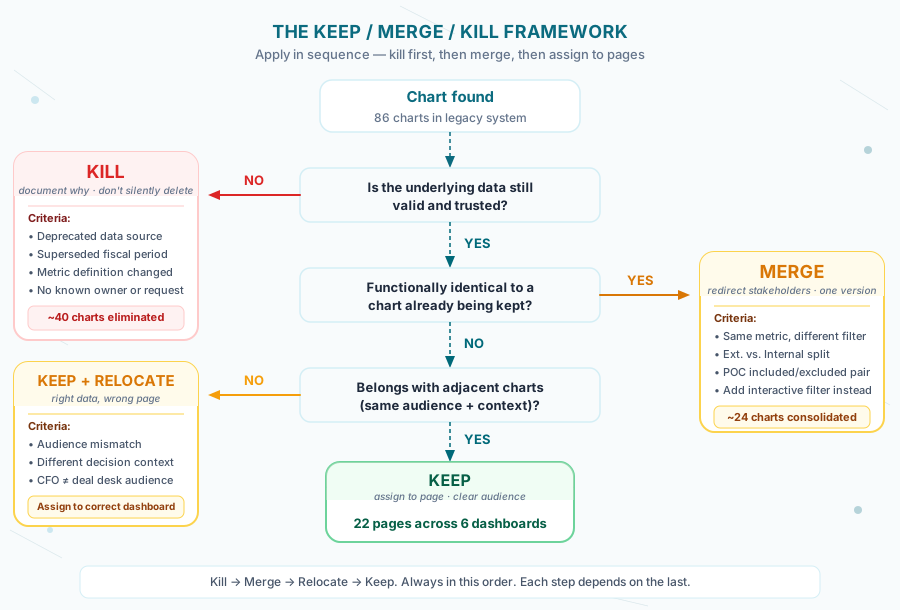
When we scoped the Sigma migration, we established a decision framework for every chart in the legacy system. Three options, applied in sequence.
For each chart:
1. Is the underlying data still valid and trusted?
   NO → Kill (document why; don't quietly delete)
2. Is this chart functionally identical to one we're already keeping?
   YES → Merge (redirect stakeholders, don't maintain two versions)
3. Does this chart belong in the same context as adjacent charts?
   NO → Keep but relocate (separate audience or different decision context)
   YES → Keep and assign to a page
The sequence matters. You can’t merge charts until you’ve killed the ones built on bad data. You can’t assign to pages until you’ve merged the duplicates.
Kill criteria. A chart is a kill candidate if: the data source is deprecated, the fiscal period it covers has been superseded, the metric definition changed and wasn’t updated, or no one can identify who requested it or why. We documented every kill with a one-line reason — not for posterity, but because stakeholders will ask “what happened to the chart that showed X” and “we deleted it because Y” is a much better answer than silence. A chart killed without documentation becomes a ghost story. A chart killed with one line of context becomes a closed ticket.
Merge criteria. A chart is a merge candidate if it shows the same metric as another chart, filtered differently. The merge target is almost always a chart with an interactive filter applied — which means the end state is fewer charts with more powerful interactivity, not a loss of analytical capability. The most common merge was External vs. Internal dashboards: a cloud security company’s analytics had grown up with separate dashboards for external customer-facing metrics and internal business metrics. By adding an Account Type filter applied across all pages, both views lived in one dashboard with no redundancy.
Keep and relocate criteria. A chart is a relocation candidate if its audience or decision context doesn’t match the adjacent charts. CFO-level ARR charts don’t belong on the same page as deal-level account detail. Not because the data is wrong, but because a person looking for ARR trends has a different job to do than a person looking at a specific account’s usage pattern. They should never be on the same scroll.
How we organized 22 pages
After applying the keep/merge/kill pass, the surviving charts fell into natural groupings. Six dashboards, each with a clear audience and purpose, organized into pages that match a user’s actual workflow.
# Dashboard structure — final state
dashboards:
  revenue_analytics_original:
    purpose: "Legacy v1 pricing — historical reference"
    pages: [overview, by_region, by_segment, reconciliation]
    audience: Finance, Analytics

  revenue_analytics_fy27:
    purpose: "Seed-driven pricing — current and forward-looking"
    pages: [overview, by_region, by_segment, reconciliation]
    audience: Finance, FP&A

  arr_dashboard_original:
    purpose: "ARR history — legacy calculation basis"
    pages: [arr_overview, cohort_analysis, churn_waterfall]
    audience: Finance, Revenue Operations

  arr_dashboard_fy27:
    purpose: "ARR with updated discount hierarchy"
    pages: [arr_overview, cohort_analysis, churn_waterfall]
    audience: Finance, Revenue Operations

  accounts_revenue_usage:
    purpose: "Account-level detail + usage metrics"
    pages: [account_summary, revenue_detail, usage_detail,
            discount_analysis, regional_breakdown, data_audit]
    audience: Deal Desk, Customer Success, Analytics

  invoice_comparison:
    purpose: "Reconciliation against partner invoices"
    pages: [comparison_overview, variance_detail]
    audience: Finance, Revenue Operations
The naming convention was deliberate. Every dashboard name says what it is and who it’s for. Every page name says what question it answers. When you land on the dashboard, you know immediately whether this is the right place to be.
The filter scope configuration prevented an entire category of confusion. In the legacy system, a filter applied to one chart was just that — one chart. You’d filter by time period and watch twelve of the charts update while eight others didn’t. We configured Sigma’s filter scope to “all pages” for global filters: account type, fiscal period, region. Filters that should be local — a chart-specific drill filter — were explicitly scoped to prevent bleed.
# Sigma filter scope configuration (conceptual)
global_filters:
  - account_type: scope=all_pages
  - fiscal_period: scope=all_pages
  - region: scope=all_pages

local_filters:
  - account_detail_drill: scope=current_page
  - comparison_period: scope=current_page
Incorrect filter scope was one of the 15 bugs we documented during the migration — charts on the ARR pages were ignoring global period filters because scope was set to “current page” by default. Fixing that bug retroactively was harder than designing for it from the start.
The implementation: migrating with live stakeholders
The migration ran alongside active use of the legacy system. Finance was pulling numbers from the legacy BI dashboards while we built the Sigma replacements. That constraint shaped the entire delivery approach.
We built in parallel, validated by replication, and cut over only after parity was confirmed at the chart level. The validation query pattern — a FULL OUTER JOIN between old and new output — is described in detail in our post on validating financial data migrations.
The page structure was built against a naming schema that made it impossible to accidentally mix production and development views:
-- Development database targets per contributor
-- dev_lead    → DBT_DEV__LEAD (project lead)
-- dev_shared  → DWH_DB_DEV      (demo / stakeholder preview)
-- prod        → DWH_DB          (CI/CD only, requires CI=true)

-- Production safety macro — blocks prod runs outside CI
{% macro validate_dev_target() %}
  {% if target.name == 'prod' and env_var('CI', 'false') != 'true' %}
    {{ exceptions.raise_compiler_error(
      "Direct prod runs blocked. Use CI pipeline."
    ) }}
  {% endif %}
{% endmacro %}
The shared dev environment meant Finance could preview the new dashboard structure before cutover without touching production data. That preview was how we caught two organizational issues before they became stakeholder complaints — a page that Finance expected to find under “Revenue” was under “ARR,” and a reconciliation view that belonged in the invoice comparison dashboard had been placed in the accounts dashboard because we’d organized by technical topic rather than by the workflow Finance actually followed.
The Finance team’s involvement in the preview also shaped the self-service layer. When the new dashboards went live, Finance could update pricing rates directly in Sigma input tables rather than filing engineering requests — a workflow documented in full in our post on empowering Finance teams with self-service analytics. The dashboard structure and the self-service model reinforce each other: organized pages make the input tables easy to find; input tables give Finance a reason to open the dashboards without waiting for a data pull.
Stakeholder management: you are deleting things people use
This is the harder half of dashboard consolidation. The technical build is clear once the structure is agreed on. The organizational work is messier.
When you remove a chart, somebody’s workflow breaks. Maybe they bookmarked the URL. Maybe they screenshot the same chart every Monday for a weekly report. Maybe the chart is wrong and they’ve been manually adjusting the numbers for months — which is its own conversation, but it still breaks their routine.
Three things made the stakeholder transition manageable.
Announce the kill list before cutting over. We published the list of charts being removed two weeks before cutover, with the reason for each removal and what replaced it. This sounds obvious. Most migrations don’t do it. The result of not doing it is a wave of “where did X go” questions after launch, each requiring individual investigation. The result of doing it is a handful of questions before launch, most of which lead to legitimate reconsiderations (“actually that chart is used in the board deck, don’t remove it”).
Hold a 30-minute walkthrough for each audience. Finance got a walkthrough of the revenue and ARR dashboards. The deal desk got a walkthrough of the accounts dashboard. Not a general “here’s the new system” session — a specific “here’s how you find the numbers you find every day” session. The most common reaction was relief. The 60-second load time dropping to under 3 seconds was immediately noticeable. The walkthrough also served as a final audit: Finance would say “wait, where’s the monthly ARR cohort?” and either we’d show them where it was, or we’d learn that we’d missed something. Two charts got added back to the primary pages based on walkthrough feedback. That’s a better outcome than discovering the gap three weeks post-launch.
Keep a redirect map for 90 days. Every removed chart got a one-line entry in a shared document: what it was, why it was removed, where the equivalent now lives. This cost about two hours to build and eliminated most of the support load post-launch. The redirect map is not documentation for posterity. It’s a 90-day grace period. After 90 days, if no one has looked something up, it wasn’t being used.
# Dashboard Redirect Map — cutover 2026-01-15
# Review date: 2026-04-15

| Legacy Chart | Removed Because | New Location |
|---|---|---|
| Revenue by Region (External) | Merged — Account Type filter replaces separate chart | ARR Dashboard > Overview, filter: External |
| ARR by Segment (POC excluded) | Duplicate — existing chart has POC toggle | Revenue Analytics > By Segment |
| Product A Regional Breakdown (2022) | Deprecated pricing period — data superseded by v2 model | N/A — historical data archived in data warehouse |
| Month-over-Month ARR Change | Merged into Cohort Analysis page with period comparison | ARR Dashboard > Cohort Analysis |
What we’d do differently
The keep/merge/kill pass is most useful when done before the migration tool is even opened. We started it early but not early enough — the dashboard structure was partially built before we finished the organizational analysis, which required two rounds of restructuring pages that were already built.
The page architecture decision is upstream of everything. Getting audience, purpose, and page structure agreed on paper before building in Sigma saved more time than any technical optimization.
One category we underestimated was the External/Internal merge. Separate dashboards had existed for good historical reasons — external metrics had once required a fundamentally different data model, and the separation had organizational meaning to different teams. The merge was technically simple (add an Account Type filter), but the organizational change required explicit signoff from both Finance and the analytics lead. A technical change that looks like a simplification can carry organizational weight. Surface it early.
One thing we’d add to the stakeholder walkthrough: a “before and after” side-by-side for the three charts each audience uses most often. Abstract claims about “faster load times” and “better organization” land differently when someone sees their actual Monday morning chart in the new location, loading in under three seconds, with the filter they always wanted already built in. Concrete beats conceptual.
The broader pattern — the one that applies to any BI consolidation project — is that dashboard proliferation is a symptom of missing filter infrastructure. Every “just add a new chart” decision is a decision made in the absence of a good filter. Fix the filter infrastructure first. The chart count reduces naturally.
That’s also the reason the 15 bugs we found during validation were worth finding, even though several of them were uncomfortable to surface. A filter scoped incorrectly to “current page” instead of “all pages” means Finance has been reading filtered numbers on some charts and unfiltered numbers on adjacent charts — and calling both “revenue.” Fixing the dashboard structure without fixing the underlying behavior would have consolidated the confusion rather than resolved it.
The 86-to-22 transition was an organizational achievement more than a technical one. The technical work was building the new dashboards; that part was clear enough. The real work was agreeing on what the dashboards were for, who was going to use them, and what “done” looked like from the user’s perspective — not the builder’s.
That conversation almost always gets skipped. The result is new charts on a new platform that accumulate just like the old ones did. Six months after launch you have 40 charts on a Sigma page and a team wondering whether it’s time for another migration.
The difference between dashboards that stay organized and dashboards that drift is whether the organizational decisions — audience, purpose, filter scope, page structure — were made explicit during the build, or left implicit for individual contributors to reconstruct from context. Explicit decisions survive team turnover. Implicit ones don’t.
Dashboard sprawl is recoverable. It just requires doing the work you skipped the first time: deciding what each chart is for before building it, not after.
Frequently Asked Questions
How do you decide which dashboards to keep vs. kill?
Apply the keep/merge/kill framework: Kill dashboards with deprecated data, no identifiable owner, or superseded by a newer version. Merge dashboards that cover the same metric with different filters or time ranges. Keep and relocate dashboards that are used but sitting in the wrong context for their audience. When in doubt, check usage data — most BI tools show last-accessed dates and view counts.
What causes 60-second dashboard load times?
The most common cause is computing 80+ charts on every page load instead of reading from pre-computed fact tables. Complex JOINs running at query time, no aggregation layer, and dashboards that query production databases directly all compound the problem. The fix is a mart layer in dbt that pre-computes aggregations at pipeline run time — dashboards then read from fast, indexed tables instead of recalculating on demand.
How many pages should a well-organized dashboard have?
There is no single right number, but the principle that worked here: one page per audience, one primary question per page. The 86-chart monolith collapsed to 22 pages across 6 dashboards — roughly 3–4 pages per dashboard, each answering a specific business question for a specific role. If a stakeholder has to scroll to find their number, there are too many charts on the page.
Can you run a keep/merge/kill audit without migrating BI platforms?
Yes — the framework is platform-agnostic. You can apply it to any existing BI tool before deciding whether to migrate. The audit produces a prioritized list of what to keep, consolidate, and retire. Running it first gives you a cleaner scope for any future migration and surfaces the quick wins (kill the dashboards nobody uses) without touching your infrastructure.
If your dashboards have more charts than anyone can use and load times that test everyone’s patience, we can run a keep/merge/kill audit in a few days. Book a dashboard review.